



Optical Character Recognition - Chrome Extension


What is Optical Character Recognition ai chrome extension?
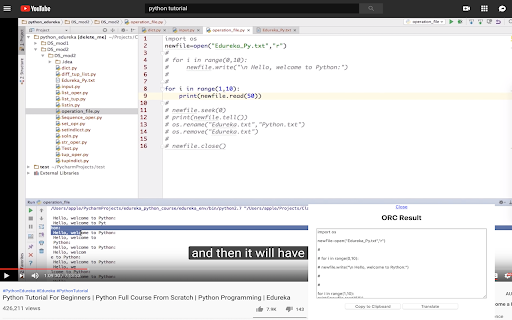
This is a handy tool to extract text from images, videos, or PDFs with just one click and crop instead of retyping the text character by character. A typical use case is to copy any text from YouTube videos or image-formatted tutorials. This tool copies text from images using the lightweight OCR engine Tesseract.js.
How to use Optical Character Recognition ai chrome extension?
1. Click the icon, then select the area/image containing the text. 2. Wait until the tool extracts the text for you. 3. Extracted result will show in a text box. You can then click the copy button to load it into your Clipboard and Ctrl + V to paste it anywhere. 4. There is an option to translate the extracted text into your selected language. 5. You can define the ORC language and targeted translation languages on the options page.
Optical Character Recognition ai chrome extension's Core Features
Extract text from images, videos, and PDFs
One-click text extraction
Copy text to clipboard
Translation option
OCR language selection
Optical Character Recognition ai chrome extension's Use Cases
Copy text from YouTube videos
Extract text from image-formatted tutorials
Convert image-based documents to editable text
FAQ from Optical Character Recognition
How do I use this tool?
Can I translate the extracted text?
How do I change the OCR language?

