Sponsored by
APIMaster



Pic to Text Converter - Chrome Extension
2.3
3 Reviews
0 Saved
Introduction:
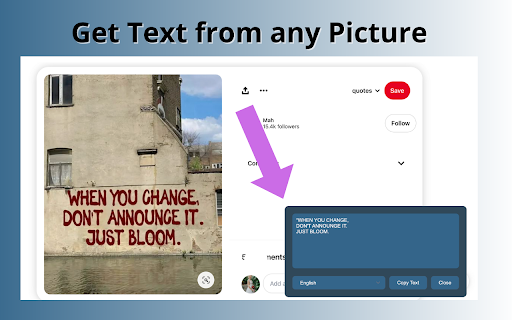
A free web-based tool to extract text from images using OCR technology.
Updated Time
Jul 21 2024
Active Users
1000

Renamer.ai
AI tool that renames and organizes files by automatically reading their actual content.

APIMaster
GPT up to 95% off + $20 trial. Fingerprint-verified APIs. Low-cost and stable.

APIMart
AI API, 99.9% SLA. Your AI, Always On.

iMean AI Trip Planner
AI trip planner that creates personalized itineraries, finds cheap flights and hotels, and helps you plan an entire trip in one chat.

Free
PoYo.AI
High concurrency. Stable AI API. Better pricing.

Pic to Text Converter AI Chrome Extension Information
What is Pic to Text Converter ai chrome extension?
Pic to Text Converter is a web-based tool that allows users to extract text from images using Optical Character Recognition (OCR) technology. It supports various image formats and languages, providing a free and unlimited way to convert images to editable text.
How to use Pic to Text Converter ai chrome extension?
To use the Pic to Text Converter, upload an image via the 'Choose File' button or drag and drop it into the input area. Click the 'Extract Now' button to initiate the OCR process. The extracted text will be displayed, ready to be copied, downloaded, or shared.
Pic to Text Converter ai chrome extension's Core Features
Accurate OCR software
Multi-Language Support
Easy Sharing
No Installation Required
Free and Unlimited Usage
Pic to Text Converter ai chrome extension's Use Cases
#1
Converting handwritten lectures to digital text for students
#2
Quickly extracting text from images for anyone needing to digitize information
#3
Translating text from images for international users
#4
Digitizing and organizing documents for better data management
FAQ from Pic to Text Converter
Can I use this tool for free?
How many pics can I convert at once?
Is my privacy protected when using this tool?
What image formats are supported?
Can I extract text from handwritten images?
YouArt
Agentic Creative OS
Try Now
AD
PostMcpAi
AI-powered social media publishing across seven networks
Try Now
AD
Analytic of Pic to Text Converter AI Chrome Extension
Pic to Text Converter Active Users
Total Installed User
1000
Alternative of Pic to Text Converter AI Chrome Extension
Website
Freemium
AI OCRAI Describe ImageAI Image Description GeneratorImage to PromptAI Caption Generator
Open site
--
Mail (0.00%)
GenAi (0.00%)
Direct (0.00%)
Open site
383 users