Sponsored by
PoYo.AI



Tackle - Chrome Extension
4.4
25 Reviews
0 Saved
Introduction:
Automated time-tracking and productivity insights tool with calendar integration and custom reporting.
Updated Time
Aug 10 2026
Active Users
2.0K

APIMart
AI API, 99.9% SLA. Your AI, Always On.

PoYo.AI
High concurrency. Stable AI API. Better pricing.

YouArt
Agentic Creative OS

Agentkit
AI agents trained on business content for support, lead capture, and automation

PostMcpAi
AI-powered social media publishing across seven networks

Tackle AI Chrome Extension Information
What is Tackle ai chrome extension?
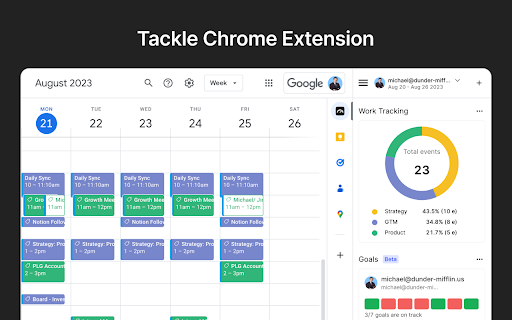
Tackle is a time-tracking and productivity insights tool that integrates with your calendar, project management, and collaboration platforms. It automates time tracking from Google Calendar, generates custom reports, and provides insights without manual effort. Tackle helps teams measure operational efficiency, track time investments, and keep projects on track by setting goals.
How to use Tackle ai chrome extension?
Install the add-on, sign up via the Google Calendar sidebar, create tags and properties, add tags to events, analyze data by date range, and export data to Google Sheets or Excel.
Tackle ai chrome extension's Core Features
Automated time tracking
Calendar integration
Customizable reports
Workflow automation
Goal tracking
Team time tracking
CRM integrations
Tackle ai chrome extension's Use Cases
#1
Tracking time spent on projects and clients
#2
Analyzing team performance and identifying areas for improvement
#3
Automating timesheet creation and export
#4
Optimizing workforce utilization and capacity
#5
Improving meeting health and productivity
FAQ from Tackle
What data can Tackle access?
How do I revoke the Google API permission I gave to Tackle?
Are you SOC2 certified?
Tripo AI
AI-powered 3D model generator from images and text.
Try Now
AD
Skild Art
一站式 AI 视觉创作平台,为商业营销而生
Try Now
AD
Analytic of Tackle AI Chrome Extension
Tackle Active Users
Total Installed User
2.0K
Alternative of Tackle AI Chrome Extension
Open site
87 users
Website
Freemium
Free Trial
AI CalendarAI SchedulingAI Productivity ToolsAI Task ManagementAI Meeting Assistant
Open site
 47.79%
602.5K
47.79%Direct (51.98%)
SearchOrganic (18.52%)
Referrals (12.01%)
Recommend To Learn
Best for Jobs
Agencies 818Professional services 16Coaching and consultancy 1Revenue ops and enablement 1Customer facing teams 2Executives & EAs 1Product and Engineering teams 4Non-profits 29Lawyers 181Construction businesses 3Tutoring companies 2Management consultants 8Startups 1054Counselors 15Accountants 200Employees 57Enterprise 13Freelancers 856Marketing 17PR 1Project managers 1212Remote workers 121Software companies 28HR 7