Sponsored by
iMean AI Trip Planner



Voice-to-Text Anywhere in Chrome with OpenAI Whisper API - Chrome Extension
1
2 Reviews
0 Saved
Introduction:
Voice-to-text Chrome extension using OpenAI Whisper API.
Updated Time
May 22 2024
Active Users
91

Wondershare Filmora
AI video editor with tools for all skill levels and creative assets.

Rekam AI-Your One-Stop Voice Creation Platform
All-in-one AI voice creation platform for text-to-speech, voice clone, and speech-to-text.

Vmake AI
AI Social Video Studio: Create, enhance, and optimize social videos that sell.

Clico
AI assistant that brings writing, summarization, and search to every browser text box.

Cheetu AI
Your Lightweight Interpreter & AI Notetaker

Free
Voice-to-Text Anywhere in Chrome with OpenAI Whisper API AI Chrome Extension Information
What is Voice-to-Text Anywhere in Chrome with OpenAI Whisper API ai chrome extension?
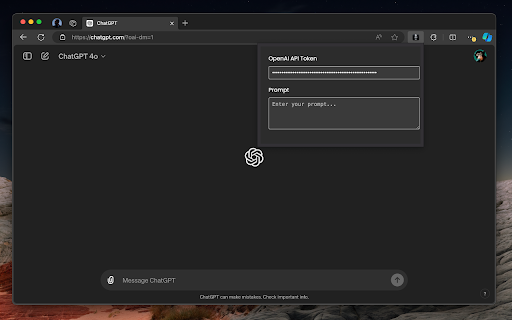
This tool enables voice-to-text functionality within the Chrome browser using the OpenAI Whisper API. It allows users to transcribe speech into text directly in any text field within Chrome, enhancing accessibility and productivity.
How to use Voice-to-Text Anywhere in Chrome with OpenAI Whisper API ai chrome extension?
Install the Chrome extension. Once installed, activate the extension and speak into your microphone. The spoken words will be transcribed into the active text field in Chrome.
Voice-to-Text Anywhere in Chrome with OpenAI Whisper API ai chrome extension's Core Features
Voice-to-text transcription in any Chrome text field
Integration with OpenAI Whisper API for accurate transcription
Voice-to-Text Anywhere in Chrome with OpenAI Whisper API ai chrome extension's Use Cases
#1
Dictating emails, documents, or social media posts directly in Chrome
#2
Transcribing online meetings or lectures in real-time
#3
Providing voice input for web forms and surveys
FAQ from Voice-to-Text Anywhere in Chrome with OpenAI Whisper API
Does this extension require an OpenAI API key?
Is my audio data secure when using this extension?
APIMart
AI API, 99.9% SLA. Your AI, Always On.
Try Now
AD
iMean AI Trip Planner
AI trip planner that creates personalized itineraries, finds cheap flights and hotels, and helps you plan an entire trip in one chat.
Try Now
Analytic of Voice-to-Text Anywhere in Chrome with OpenAI Whisper API AI Chrome Extension
Voice-to-Text Anywhere in Chrome with OpenAI Whisper API Active Users
Total Installed User
91 (13)
Alternative of Voice-to-Text Anywhere in Chrome with OpenAI Whisper API AI Chrome Extension
Website
Freemium
Contact for Pricing
AI Speech-to-TextAI TranscriptionAI Speech RecognitionAI Developer Tools
Open site
 35.21%
457.8K
35.21%Direct (64.41%)
SearchOrganic (18.69%)
SocialOrganic (6.13%)
More Content About Voice-to-Text Anywhere in Chrome with OpenAI Whisper API
9 Ways Whisper Speaker Diarization Enhances Podcast Production
By Ethan on July 26 2024
Boost your podcast quality with Whisper Speaker Diarization! Learn how this amazing tool can revolutionize your content creation process in 9 simple steps.
Recommend To Learn
voice to text transcriber
voice to text chrome
speech to text voice
voice to speech ai
voice to ai
speech to speech ai
speech to speech
chrome speech to text
to text to speech
ai speech recognition
ai voice recognition
voice to voice ai
voice transcription
voice recognition voice recognition
recognition voice
transcription ai
voice recognition
ai transcription
voz
Voice conversion
Text-To-Speech
Speech-To-Text
Text-to-speech
speech to text
Speech
Voice-to-Text
Text-to-video
Image-to-image
Voice
Text To Voice
texto a voz