



Total runs:
213.5K
Run Growth:
125.2K
Growth Rate:
58.61%








MOSS‑TTS Family is an open‑source speech and sound generation model family from MOSI.AI and the OpenMOSS team . It is designed for high‑fidelity , high‑expressiveness , and complex real‑world scenarios , covering stable long‑form speech, multi‑speaker dialogue, voice/character design, environmental sound effects, and real‑time streaming TTS.
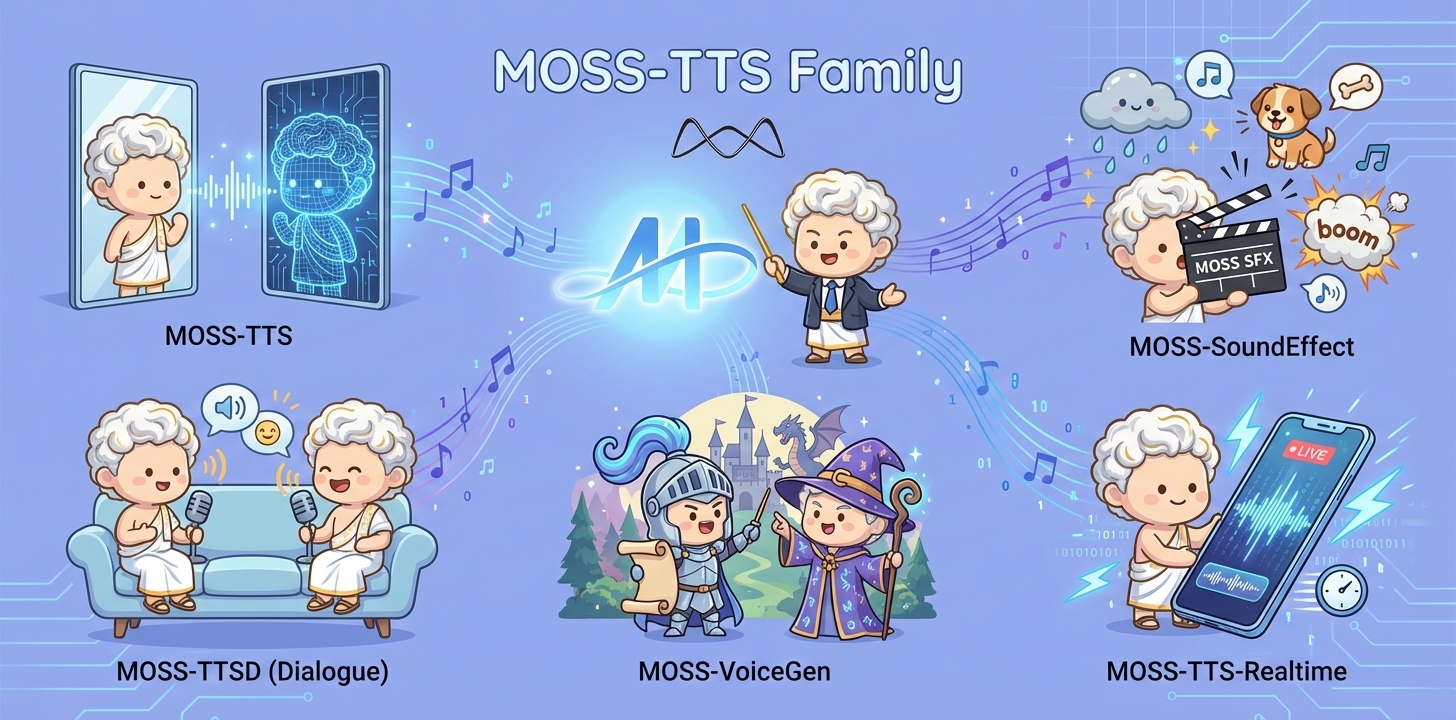
When a single piece of audio needs to sound like a real person , pronounce every word accurately , switch speaking styles across content , remain stable over tens of minutes , and support dialogue, role‑play, and real‑time interaction , a single TTS model is often not enough. The MOSS‑TTS Family breaks the workflow into five production‑ready models that can be used independently or composed into a complete pipeline.
| Model | Architecture | Size | Model Card | Hugging Face |
|---|---|---|---|---|
| MOSS-TTS | MossTTSDelay | 8B | moss_tts_model_card.md | 🤗 Huggingface |
| MossTTSLocal | 1.7B | moss_tts_model_card.md | 🤗 Huggingface | |
| MOSS‑TTSD‑V1.0 | MossTTSDelay | 8B | moss_ttsd_model_card.md | 🤗 Huggingface |
| MOSS‑VoiceGenerator | MossTTSDelay | 1.7B | moss_voice_generator_model_card.md | 🤗 Huggingface |
| MOSS‑SoundEffect | MossTTSDelay | 8B | moss_sound_effect_model_card.md | 🤗 Huggingface |
| MOSS‑TTS‑Realtime | MossTTSRealtime | 1.7B | moss_tts_realtime_model_card.md | 🤗 Huggingface |
MOSS Voice Generator is an open-source voice generation system designed to enable the creation of custom speaker timbres from free-form textual descriptions. This model allows users to generate voices that reflect specific characters, personalities, and emotions. It is particularly notable for its ability to produce speech with natural-sounding emotional expressiveness, providing a realistic and nuanced listening experience. As an open-source tool, MOSS Voice Generator is suitable for a variety of applications, such as audiobooks, game dubbing, role-playing agents, and conversational assistants.
MOSS Voice Generator is a high-fidelity voice design tool within the broader TTS Family. It specializes in crafting expressive and natural-sounding voices from textual descriptions. Unlike traditional TTS systems relying on predefined voices or reference audio, MOSS Voice Generator enables zero-shot voice design, allowing for the creation of customized voices for a variety of applications, such as characters, audiobooks, games, or virtual assistants. Additionally, it can serve as a voice design layer for other TTS systems, addressing the challenge of finding suitable reference audio and improving integration and performance.
Key Capabilities
MOSS Voice Generator employs MossTTSDelay architecture (see moss_tts_delay/README.md for more details), where voice description instructions and the text to be synthesized are concatenated and jointly tokenized as input to drive speech generation, enabling unified modeling of timbre design, style control, and content synthesis. Through instruction-timbre alignment, the model learns the correspondence between textual descriptions and acoustic features, allowing it to generate high-fidelity speech with target timbre, emotion, and style directly from free-form text prompts—without requiring any reference audio.
Recommended decoding hyperparameters
| Model | audio_temperature | audio_top_p | audio_top_k | audio_repetition_penalty |
|---|---|---|---|---|
| MOSS-VoiceGenerator | 1.5 | 0.6 | 50 | 1.1 |
We recommend a clean, isolated Python environment with Transformers 5.0.0 to avoid dependency conflicts.
conda create -n moss-tts python=3.12 -y
conda activate moss-tts
Install all required dependencies:
git clone https://github.com/OpenMOSS/MOSS-TTS.git
cd MOSS-TTS
pip install --extra-index-url https://download.pytorch.org/whl/cu128 -e .
For better speed and lower GPU memory usage, you can install FlashAttention 2 if your hardware supports it.
pip install --extra-index-url https://download.pytorch.org/whl/cu128 -e ".[flash-attn]"
If your machine has limited RAM and many CPU cores, you can cap build parallelism:
MAX_JOBS=4 pip install --extra-index-url https://download.pytorch.org/whl/cu128 -e ".[flash-attn]"
Notes:
pyproject.toml
, which currently pins
torch==2.9.1+cu128
and
torchaudio==2.9.1+cu128
.
torch.float16
or
torch.bfloat16
.
import os
from pathlib import Path
import torch
import torchaudio
from transformers import AutoModel, AutoProcessor
# Disable the broken cuDNN SDPA backend
torch.backends.cuda.enable_cudnn_sdp(False)
# Keep these enabled as fallbacks
torch.backends.cuda.enable_flash_sdp(True)
torch.backends.cuda.enable_mem_efficient_sdp(True)
torch.backends.cuda.enable_math_sdp(True)

pretrained_model_name_or_path = "OpenMOSS-Team/MOSS-VoiceGenerator"
device = "cuda" if torch.cuda.is_available() else "cpu"
dtype = torch.bfloat16 if device == "cuda" else torch.float32

processor = AutoProcessor.from_pretrained(
    pretrained_model_name_or_path,
    trust_remote_code=True,
    normalize_inputs=True, # normalize text and instruction input
)
processor.audio_tokenizer = processor.audio_tokenizer.to(device)


# ====== Batch demo  ======
text1="哎呀,我的老腰啊,这年纪大了就是不行了。"
instruction1="疲惫沙哑的老年声音缓慢抱怨,带有轻微呻吟。"

text2="亲爱的观众们,今天我要为大家做一道传说中的龙须面,这道面条细如发丝,需要极其精湛的手艺才能制作成功,请大家仔细观看我的每一个动作。"
instruction2="热情的美食节目主持人,语调生动活泼,充满对美食的热爱和专业精神。"

text3="Hey there, stranger! What brings you to our humble town? Looking for a good drink or a tall tale?"
instruction3="Hearty, jovial tavern owner's voice, loud and welcoming with a slightly gruff, friendly tone in American English, radiating warmth and hospitality."

text4="The quick brown fox jumps over the lazy dog."
instruction4="Clear, neutral voice for phonetic practice, even tempo and precise articulation in standard American English, emphasizing clarity of each word."

conversations = [
    [processor.build_user_message(text=text1, instruction=instruction1)],
    [processor.build_user_message(text=text2, instruction=instruction2)],
    [processor.build_user_message(text=text3, instruction=instruction3)],
    [processor.build_user_message(text=text4, instruction=instruction4)],
]

model = AutoModel.from_pretrained(
    pretrained_model_name_or_path,
    trust_remote_code=True,
    attn_implementation="sdpa",
    torch_dtype=dtype,
).to(device)
model.eval()

batch_size = 1

messages = []
save_dir = Path("inference_root")
save_dir.mkdir(exist_ok=True, parents=True)
sample_idx = 0
with torch.no_grad():
    for start in range(0, len(conversations), batch_size):
        batch_conversations = conversations[start : start + batch_size]
        batch = processor(batch_conversations, mode="generation")
        input_ids = batch["input_ids"].to(device)
        attention_mask = batch["attention_mask"].to(device)

        outputs = model.generate(
            input_ids=input_ids,
            attention_mask=attention_mask,
        )

        for message in processor.decode(outputs):
            audio = message.audio_codes_list[0]
            out_path = save_dir / f"sample{sample_idx}.wav"
            sample_idx += 1
            torchaudio.save(out_path, audio.unsqueeze(0), processor.model_config.sampling_rate)
UserMessage
| Field | Type | Required | Description |
|---|---|---|---|
text
|
str
|
Yes | Text to synthesize. Supports Chinese and English. |
instruction
|
str
|
Yes | Specify the style or the synthesized speech. Users can provide detailed speech style instructions, such as emotion, speed, pitch, and voice characteristics. |
| Parameter | Type | Default | Description |
|---|---|---|---|
audio_temperature
|
float
|
1.5 | Higher values increase variation; lower values stabilize prosody. |
audio_top_p
|
float
|
0.6 | Nucleus sampling cutoff. Lower values are more conservative. |
audio_top_k
|
int
|
50 | Top-K sampling. Lower values tighten sampling space. |
audio_repetition_penalty
|
float
|
1.1 | >1.0 discourages repeating patterns. |
Note: MOSS-Voice-Generator is sensitive to decoding hyperparameters . See Released Models for recommended defaults.
MOSS Voice Generator demonstrates significant advantages in subjective evaluation. Using 160 internal test samples covering diverse voice styles, we established three independent evaluation dimensions: (1) Overall Preference - Which voice would you choose? (2) Instruction Following - Which audio best follows the instructions (gender, age, tone, emotion, accent, speed)? (3) Naturalness - Which audio sounds most like real human speech? Results show that MOSS Voice Generator outperforms all TTS systems that support zero predefined voices and customizable preview text across these three dimensions.