































Table of Contents
- Key Points
- Crafting Viral Anime Reels: A Comprehensive Guide
- Benefits of Using AI Tools for Anime Reel Creation
- FAQ
- Related Questions


Crafting Viral Anime Reels: A Comprehensive Guide
The Anime Reel Phenomenon
The allure of anime-style reels lies in their visually stunning and emotionally evocative nature. These short-form videos often depict serene landscapes, melancholic characters, or dramatic scenes, set to captivating Music. The combination creates an immersive experience that resonates with viewers, making them highly shareable. The key to their success lies in a Blend of aesthetic appeal and emotional connection, making them perfect for platforms like Instagram, TikTok, and Facebook.
Step 1: Creating Anime-Style Images Using AI
The first step towards creating a viral anime reel is to generate striking visuals. While traditional Anime Art requires significant skill and time, AI Tools now offer a quick and accessible alternative. Leonardo.Ai (https://leonardo.ai) is a good platform for generating anime-style images for free.
- Sign Up: Head over to the Leonardo.AI Website and sign up for an account.
- Image Creation: Click on the “Image Creation” option.
- Select Anime Preset: Go to 'Presets' and choose the "Anime" option. This configures the AI to generate images in the distinct anime aesthetic.
- Aspect Ratio: Select the aspect ratio that suits your needs, like a portrait 9:16 ratio for platforms such as Instagram Reels.
- Prompt Engineering: Describe the image you want to create in the Prompt box. For example, you can type 'A Samurai rests peacefully at sunset'. Click on the generate button and the tool will generate different options for you to choose from.
Enhancing Prompts with ChatGPT
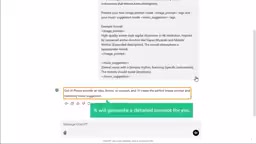
While Leonardo.Ai can generate images from basic prompts, using more detailed and descriptive prompts will yield better results. ChatGPT (https://chat.openai.com) can help craft these prompts. By providing ChatGPT with instructions, such as 'You’re an expert in crafting detailed image prompts for anime style reels and recommending the perfect background music', it generates prompts with specific parameters and artistic direction. Copy the provided prompt to Leonardo.Ai, then the tool will help you generate a well written prompt for images and music to suit your reel perfectly.
This allows you to get an image with more specific details
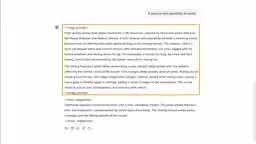
, which results in a well written prompt for images.
Step 2: Converting Images into Motion Videos
Once you've crafted your anime-style image, the next step is to bring it to life through motion. This can be achieved using tools like MatHub.AI (https://mathub.ai/). MatHub.AI allows you to easily transform still images into engaging motion videos with subtle animation and depth effects.
Follow these steps:
- Sign Up: Visit the MatHub.AI website and sign up using your Google account.
- Image Upload: Navigate to the “Create” section and choose the “Image to Video” tab.
- Select Image: Upload the anime-style image that you created.
- Motion Generation: It will start transforming your image into a video.
- Video Preview and Download: Once the process is complete, preview your video. If satisfied, download the video file to your computer.
Step 3: Generating Background Music
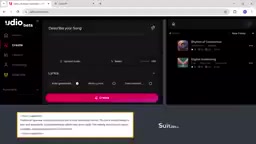
Background music is crucial in setting the emotional tone of your anime reel. Udio (https://www.udio.com/) is an AI-powered platform that allows you to generate royalty-free Music tailored to your video's theme. With Udio, you can create unique and copyright-safe soundtracks. This provides unique music that adds greatly to the aesthetic of your reel, and makes your content stand out more.
Follow these steps to generate background music:
- Sign Up: Go to the Udio website and sign up for an account.
- Provide a description: Here you need to enter the type of music you would like to create. Remember the prompt ChatGPT provided, which is perfect for creating music that suits the video.
- Music Creation: You can find different soundtracks for you to preview.
- Download Soundtrack: Click the three dots and click download, to download as an MP3 file.
Step 4: Editing the Reel
With all the elements prepared, the final step is to combine them into a Cohesive and engaging reel. This can be done using online video editing tools such as ClipChamp (https://clipchamp.com/). ClipChamp offers a user-friendly interface for assembling videos, adding music, and applying visual enhancements.
Here's how to edit your reel:
- Sign Up: Go to the ClipChimp website and click try for free to sign up for an account.
- Import Media: Import media to upload your video file and audio file.
- Finalization: Edit your video to your liking and finalize it.





Most people like



































Report
Please select a reason for reporting
- 13 Reasons to Switch from Snapchat to Text Messaging
- 7 Powerful Speech to Text Apps to Boost Productivity
- 10 Best Speech to Text Tools for Effortless Transcription
- 13 Free Tools to Easily Transcribe Audio to Text
- 15 Surprising Ways Google's Speech-to-Text Boosts Productivity
- 7 Best Free Online Audio to Text Transcription Tools
- 9 Tips to Transcribe Speech to Text Faster and Better
- 13 Best Speech to Text Software for Windows 10 in 2023
- 7 Tips for Choosing the Best Transcriber for Audio to Text
- 11 Reasons Why Dragon Speech-to-Text Apps are Game-Changers
- 6 Secrets to Enhance Your Speech to Text Transcription
- 6 Brilliant Ways to Boost Productivity with Talk-to-Text on Your MacBook
- 6 Ways Transcription Software Converts Audio to Text
- 8 Tips to Transcribe Speech to Text Like a Pro
- 6 Reasons IBM Watson Speech to Text is a Game-Changer
- 14 Powerful Ways Talk-to-Text Improves Your Workflow
- 12 Top Windows Speech-to-Text Software for Efficient Transcription
- 12 Game-Changing Benefits of Apple's Speech to Text Technology
- 9 Powerful Use Cases for AWS Speech to Text Technology
- 10 Easy Steps to Transcribe YouTube Videos to Text
- transcription audio en texte
- online audio transcription
- free audio file transcription
- free ai audio transcription
- audio transcription service
- audio transcription online free
- audio transcription free online
- audio to transcription software
- audio and transcript
- ai audio transcription free
- voice recording to text converter
- translate voice recording to text
- record voice to text
- audio recording to text converter
- voice recording and transcription
- chatgpt voice to text
- gmail voice to text
- speech to text reader
- speech to text ai free
- speech to talk
- How to Use AI Tools to Find Internal Linking Opportunities Across a Business Website
- Discover Your Perfect Haircut with AI Hairstyle Apps
- Free Reputation Calculator Tools: How They're Adapting to Score AI Visibility, Not Just Rankings
- Design Professional Flyers for Free on Your Phone
- Best Free Flyer Maker Apps for Android: Design Like a Pro
- How to Know If Your Business Is Ready for an AI Customer Service Agent
- Revolutionizing Storytelling: From Novels to Screenplays with AI
- Create Engaging Animated Explainer Videos with a Free AI Tool
- Stop Multi-Subscribing: Benchmark Top AI Visual Models in One Canvas
- Best Seedance 2.5 API Provider: Every Price on the Market, Checked at Source
- Top AI Social Media Management Tools: Automate Your Content Strategy
- Free AI Text to Video Generator: Create Stunning Videos from Text
- Discover 17 ChatGPT Alternatives: A Comprehensive Comparison
- Character.AI vs. Janitor AI: Which AI Chat Platform Reigns Supreme?
- Top Virtual Assistant Companies in 2026: Reviews, Pricing, and Plans Compared
- Unveiling FaceCheck.ID: Revolutionizing Reverse Image Searches with AI
- 11 Best AI Dialers in 2026: Features, Pricing, Pros and Cons
- How I Direct Consistent AI Clips: A Hands-On Guide to Multi-Model Generation
- A Realistic Review of the Photo Generator Image Tool
- Playwright MCP Server: Automated Web Testing with Agent Mode

Copyright ©2026 toolify