































Table of Contents
- Key Points
- Understanding Hostinger AI Assistant
- Content Creation Tips
- Using Hostinger AI Assistant: A Practical Guide
- Pros and Cons of Hostinger AI Assistant
- Core Features of the Hostinger AI Assistant
- Use Cases for Hostinger AI Assistant
- Frequently Asked Questions (FAQ)
- Related Questions


Understanding Hostinger AI Assistant
What is Hostinger AI Assistant?
The Hostinger AI Assistant is a WordPress plugin designed to help website owners generate content using artificial intelligence . It integrates directly into your WordPress dashboard, providing tools to create blog posts, page content, and other types of written material. The primary goal is to simplify and expedite the content creation process, allowing users to focus on other aspects of website management. It helps streamline the creation of SEO-friendly content. For webmasters looking to save time, it is the perfect solution. Hostinger AI Assistant offers tools designed to engage your audience. This is a great solution for those who struggle with writer's block or content development.
Key Benefits of Using Hostinger AI Assistant:
- Time-Saving: Generate content quickly, reducing the time spent on writing from scratch.
- SEO Optimization: Create content that is optimized for search engines to improve your website's visibility.
- Content Ideas: Overcome writer's block by getting AI-generated suggestions and content frameworks.
- Engaging Material: Produce content that resonates with your audience, keeping them interested and informed.
- Image Generation: With the inclusion of the AI Image Generator, you can create stunning visuals for your blog. You can set these as featured images or include them in your content.
Whether you're a seasoned blogger or a beginner, this tool aims to simplify the process of creating high-quality, SEO-optimized content for your WordPress site, making it easier to attract and retain visitors. In today's digital landscape, where content is king, the Hostinger AI Assistant offers a promising solution for efficient and effective content creation.
Installation and Access
Installing the Hostinger AI Assistant is a straightforward process, especially if you're already hosting your website with Hostinger
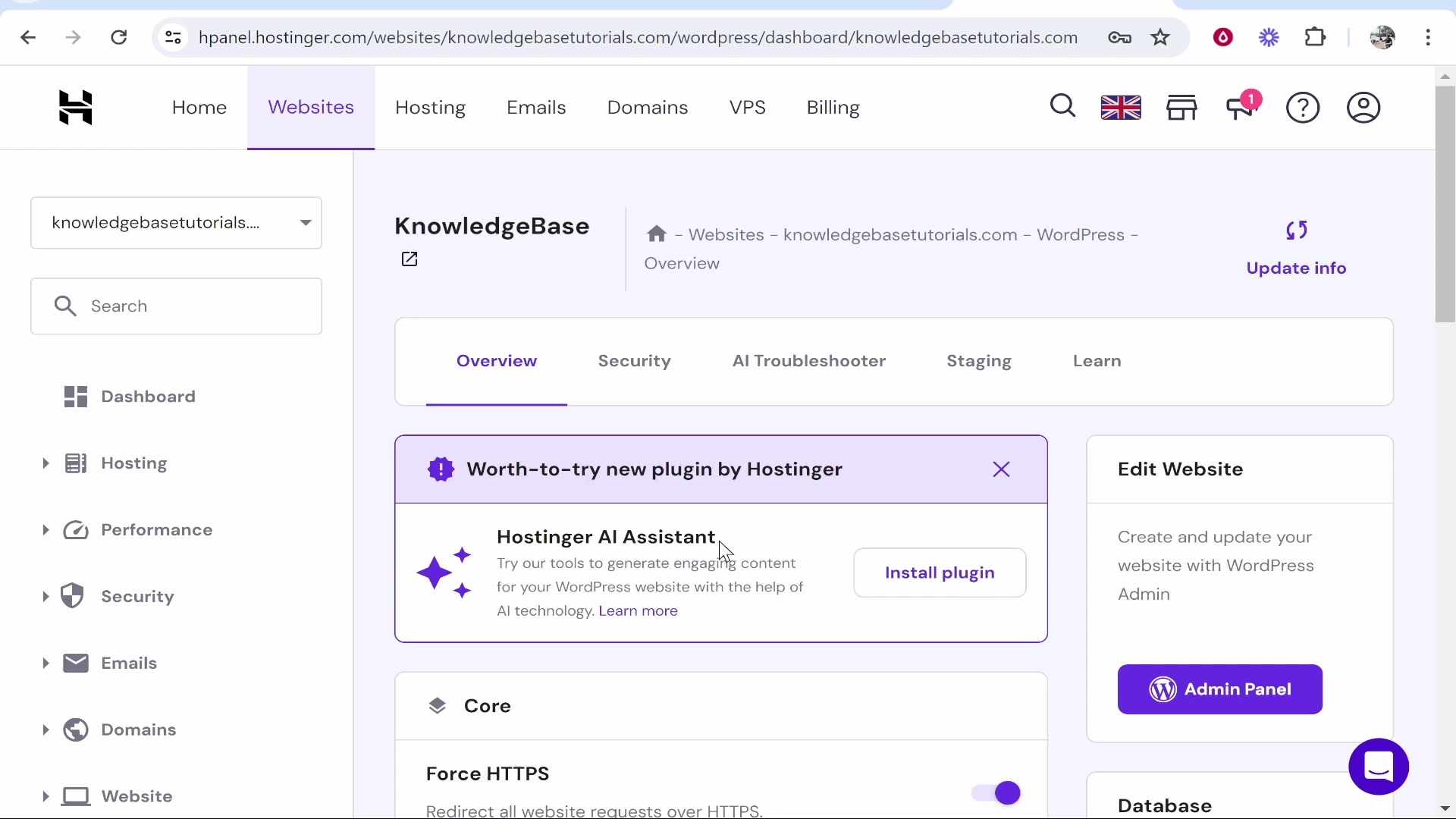
. Once logged into your Hostinger account, you'll typically find a notification or suggestion to install the plugin directly from your hPanel. This streamlined installation ensures a hassle-free setup, allowing you to quickly integrate the AI assistant into your WordPress workflow.
Step-by-Step Installation:
- Login to Hostinger: Access your Hostinger account through their website.
- Locate the Notification: Look for a notification in your hPanel suggesting the installation of the Hostinger AI Assistant plugin. This is often prominently displayed for easy access.
- Install the Plugin: Click on the "Install plugin" button provided in the notification. This will initiate the installation process.
- Automatic Installation: The plugin will be automatically installed on your WordPress website, simplifying the technical aspects of the setup.
- Access via WordPress Dashboard: After installation, access the AI Content Creator through your WordPress dashboard. This is usually located in the left-hand menu, under the Hostinger section.
By following these simple steps, you can quickly add the Hostinger AI Assistant to your WordPress site and start leveraging its content generation capabilities. This ease of installation is particularly beneficial for users who are not technically inclined, allowing them to focus on creating content rather than troubleshooting installation issues.
Using Hostinger AI Assistant: A Practical Guide
Step 1: Accessing the AI Content Creator
Once the Hostinger AI Assistant plugin is installed and activated, access it via the WordPress dashboard. Look for the Hostinger tab in the left-hand menu
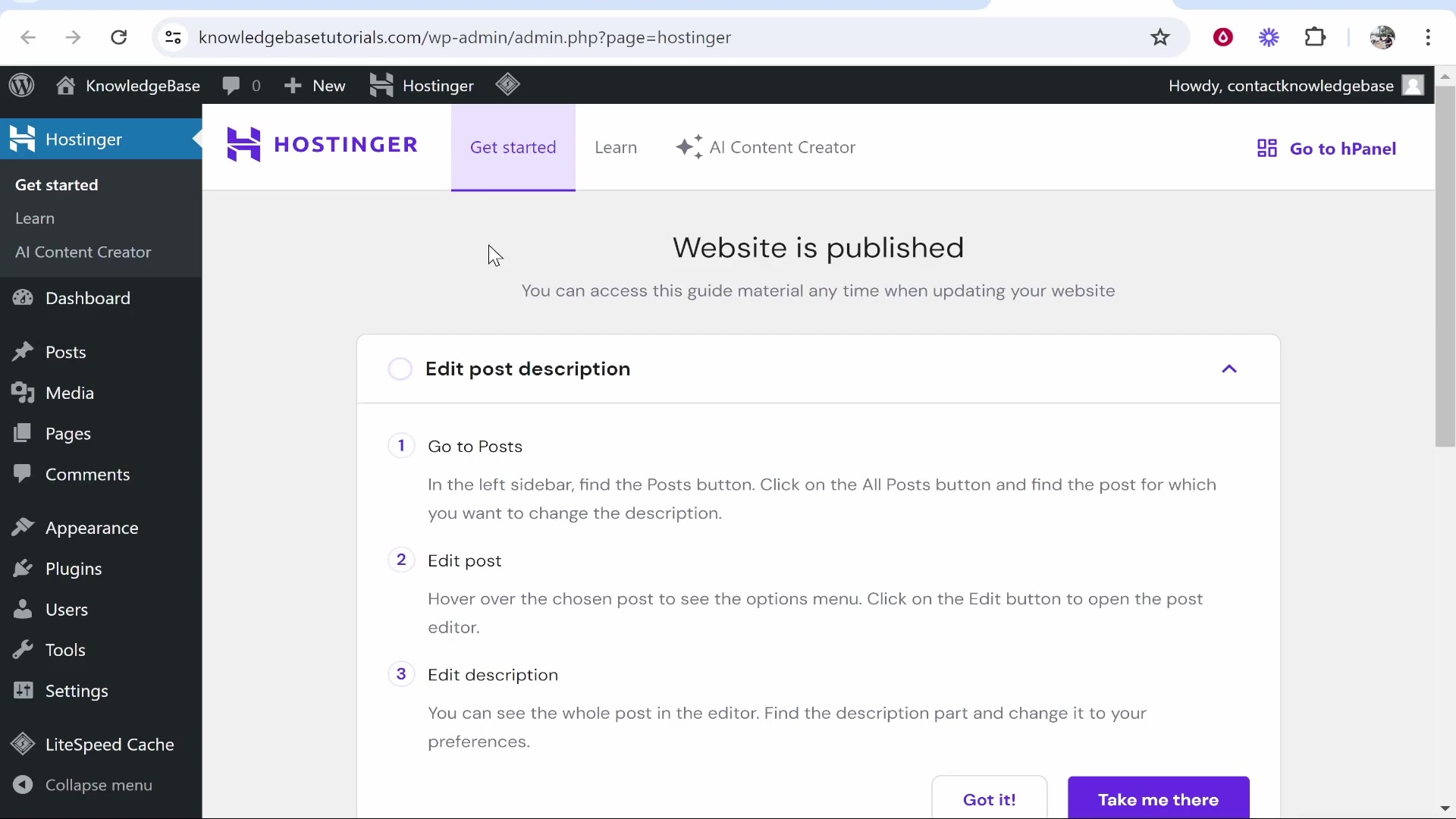
. Under this tab, you will find the AI Content Creator option. Clicking on this option will take you to the AI assistant interface where you can begin generating content.
Step 2: Defining Your Content Requirements
The next step involves defining your content requirements. This includes specifying the type of content you want to create (e.g., blog post, page content), the topic or keywords, and any specific instructions or guidelines
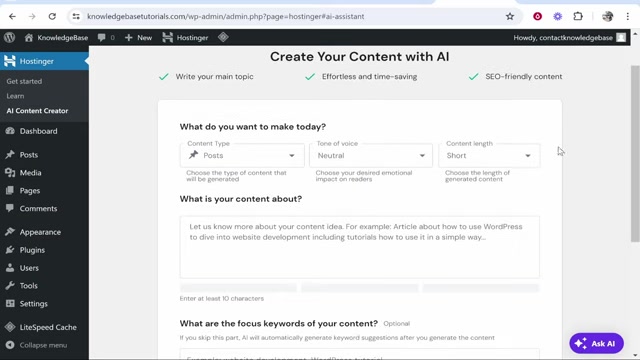
. Providing clear and detailed instructions helps the AI generate content that aligns with your expectations.
Step 3: Generating and Reviewing Content
After defining your content requirements, click the generate button to initiate the AI content creation process
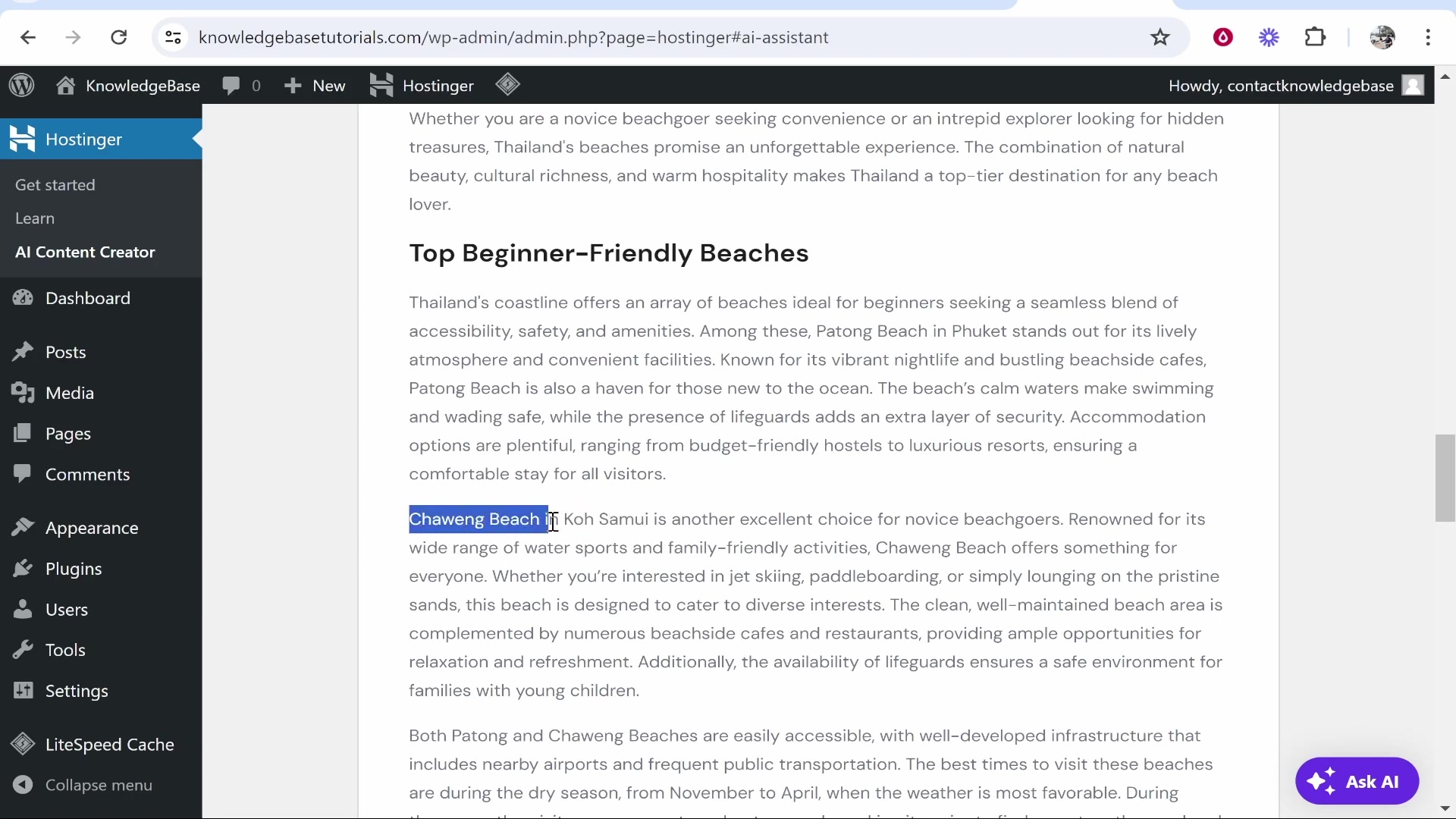
. The AI will then generate a piece of content based on your input. Review the generated content carefully to ensure it meets your standards for quality, accuracy, and relevance. Some editing and refinement may be necessary to align the content with your brand voice and style.
Step 4: Publishing and Optimizing
Once you are satisfied with the generated content, publish it on your WordPress website. Use the SEO optimization tools provided by the AI Assistant to further enhance the content's visibility and reach. This includes optimizing the title, meta description, and keywords to improve search engine rankings.
Core Features of the Hostinger AI Assistant
AI-Powered Content Generation
The core functionality of the Hostinger AI Assistant lies in its ability to generate content using artificial intelligence. This feature allows users to input a topic or idea and receive a written piece of content in return
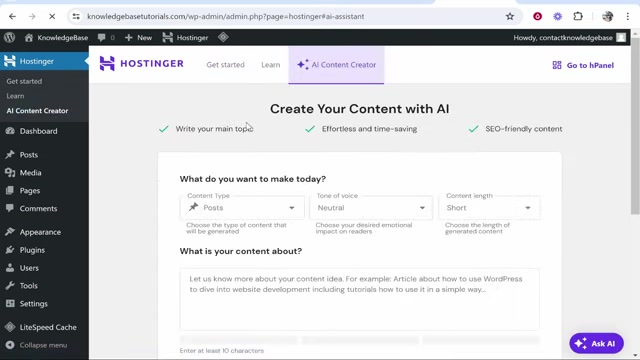
. The AI analyzes the input and creates content that is relevant, coherent, and engaging. You just need to follow a few simple steps:
- Write your main topic: Write a topic or idea of your content.
- Select the content type: Indicate the type of the content you want. You can select Post or Pages.
- Select the tone of voice: Choose the tone you want for your writing.
- Set the content length: Choose the length of the content you want to generate.
- Focus keywords: If you want to focus on specific keywords, you can add them. If you skip this part, the AI will automatically generate keyword suggestions after you generate the content.
SEO Optimization Tools
SEO optimization is a critical component of any successful online content strategy. The Hostinger AI Assistant includes tools designed to help users create content that is not only engaging but also search engine friendly. The assistant analyzes keywords, suggests relevant terms, and optimizes the content structure to improve search engine rankings. By focusing on SEO, the plugin helps ensure that your content reaches a wider audience, increasing traffic and engagement.
Key SEO Features:
- Keyword Analysis: Identifies and suggests relevant keywords to include in your content.
- Content Structure: Optimizes the structure of your content to improve readability and SEO performance.
- Meta Descriptions: Helps you create compelling meta descriptions that attract clicks from search engine results pages.
- Title Optimization: Suggests optimized titles that improve click-through rates and SEO rankings.
By leveraging these SEO features, users can enhance their content's visibility and attract more organic traffic to their websites. This focus on SEO ensures that the content created is not only informative but also effective in driving traffic and engagement.
AI Image Generation
The Hostinger AI Assistant goes beyond just text generation by also offering AI image generation capabilities
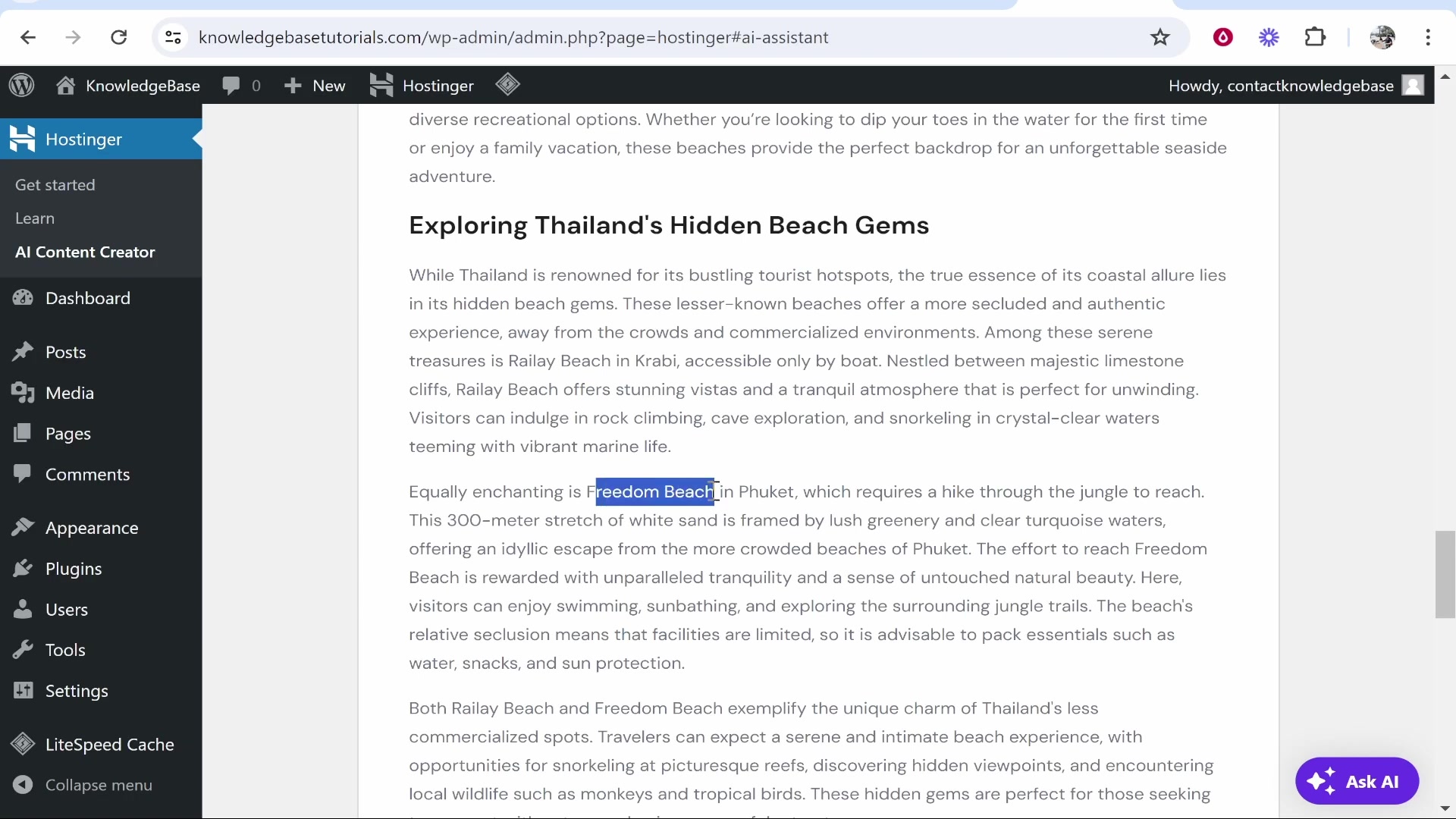
. This feature allows users to create unique and relevant images to accompany their content, enhancing visual appeal and engagement. You can use the AI images as thumbnails or insert them inside the content. Instead of spending time searching for stock photos or creating your own graphics, you can rely on the AI to produce high-quality visuals that complement your written material. Using AI images can give you unique, stunning visuals that catch the eye of visitors.





Most people like

































Report
Please select a reason for reporting
- 13 Reasons to Switch from Snapchat to Text Messaging
- 7 Powerful Speech to Text Apps to Boost Productivity
- 10 Best Speech to Text Tools for Effortless Transcription
- 13 Free Tools to Easily Transcribe Audio to Text
- 15 Surprising Ways Google's Speech-to-Text Boosts Productivity
- 7 Best Free Online Audio to Text Transcription Tools
- 9 Tips to Transcribe Speech to Text Faster and Better
- 13 Best Speech to Text Software for Windows 10 in 2023
- 7 Tips for Choosing the Best Transcriber for Audio to Text
- 11 Reasons Why Dragon Speech-to-Text Apps are Game-Changers
- 6 Secrets to Enhance Your Speech to Text Transcription
- 6 Brilliant Ways to Boost Productivity with Talk-to-Text on Your MacBook
- 6 Ways Transcription Software Converts Audio to Text
- 8 Tips to Transcribe Speech to Text Like a Pro
- 6 Reasons IBM Watson Speech to Text is a Game-Changer
- 14 Powerful Ways Talk-to-Text Improves Your Workflow
- 12 Top Windows Speech-to-Text Software for Efficient Transcription
- 12 Game-Changing Benefits of Apple's Speech to Text Technology
- 9 Powerful Use Cases for AWS Speech to Text Technology
- 10 Easy Steps to Transcribe YouTube Videos to Text
- transcription audio en texte
- online audio transcription
- free audio file transcription
- free ai audio transcription
- audio transcription service
- audio transcription online free
- audio transcription free online
- audio to transcription software
- audio and transcript
- ai audio transcription free
- voice recording to text converter
- translate voice recording to text
- record voice to text
- audio recording to text converter
- voice recording and transcription
- chatgpt voice to text
- gmail voice to text
- speech to text reader
- speech to text ai free
- speech to talk
- How to Use AI Tools to Find Internal Linking Opportunities Across a Business Website
- Discover Your Perfect Haircut with AI Hairstyle Apps
- Free Reputation Calculator Tools: How They're Adapting to Score AI Visibility, Not Just Rankings
- Design Professional Flyers for Free on Your Phone
- Best Free Flyer Maker Apps for Android: Design Like a Pro
- How to Know If Your Business Is Ready for an AI Customer Service Agent
- Revolutionizing Storytelling: From Novels to Screenplays with AI
- Create Engaging Animated Explainer Videos with a Free AI Tool
- Stop Multi-Subscribing: Benchmark Top AI Visual Models in One Canvas
- Best Seedance 2.5 API Provider: Every Price on the Market, Checked at Source
- Top AI Social Media Management Tools: Automate Your Content Strategy
- Free AI Text to Video Generator: Create Stunning Videos from Text
- Discover 17 ChatGPT Alternatives: A Comprehensive Comparison
- Character.AI vs. Janitor AI: Which AI Chat Platform Reigns Supreme?
- Top Virtual Assistant Companies in 2026: Reviews, Pricing, and Plans Compared
- Unveiling FaceCheck.ID: Revolutionizing Reverse Image Searches with AI
- 11 Best AI Dialers in 2026: Features, Pricing, Pros and Cons
- How I Direct Consistent AI Clips: A Hands-On Guide to Multi-Model Generation
- A Realistic Review of the Photo Generator Image Tool
- Playwright MCP Server: Automated Web Testing with Agent Mode

Copyright ©2026 toolify