































Table of Contents
- Key Points
- Unveiling Adobe Acrobat Studio's Powerful Capabilities
- Crafting a Personalized Knowledge Base: Tailoring Acrobat Studio to Your Needs
- Pros and Cons of Adobe Acrobat Studio for Professionals
- FAQ
- Related Questions



Unveiling Adobe Acrobat Studio's Powerful Capabilities
The Evolution of Document Management with Acrobat Studio
Adobe Acrobat Studio is more than just a tool for editing and managing documents; it’s an entire ecosystem designed to transform how professionals interact with information.
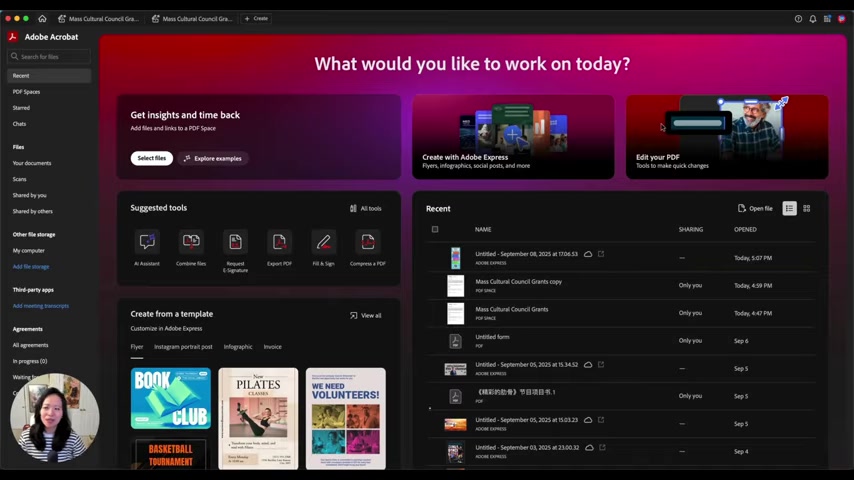
In 2025, this ecosystem centers around four core features within PDF Spaces: Insights, Chats, Notes, and Files. These features are designed to help the user with document management and Task Management.
The traditional model of document management often involves scattered files, emails, and notes, making it difficult to maintain organization and efficiency. Acrobat Studio streamlines this with features that aggregate files, create a Knowledge Base with personalized notes, and task management for increased efficiency. This helps enhance team collaborations for people across the world.
The Power of PDF Spaces: A Centralized Hub
Imagine a world where all your documents, PDFs, WORD documents, and even links from various websites containing vital information are aggregated in one centralized location. That’s the power of PDF Spaces.

These spaces are customizable and scalable, allowing you to create as many as you need, and each can host up to 100 documents or links. This level of organization transforms how one approaches document management, enabling users to create and manage their own database.
PDF Spaces is comprised of Insights, Chat, Notes, and Files offering many features that are highly beneficial in document management. When working with extensive information, PDF spaces offer users the ability to ask the AI assistant any questions they may have about the subject at hand. The new features provided in Acrobat Studio make it simple and easy to stay on task.
AI Assistant Chatbots for Enhanced Productivity
With Adobe Acrobat Studio, you can create a personal bot, leveraging AI to answer your questions.

This AI assistant becomes your personal expert, capable of providing quick and accurate answers based on your uploaded documents and links. This is a Game-changer for research, Project Management, and quick access to pertinent details.
AI assistants use all of the information given to them within the document to form a solid answer to any query a user may have. This enhanced productivity feature keeps you in the loop for all things important.
Real-World Application: Grant Applications
To illustrate the power of Adobe Acrobat Studio, consider the real-world example of grant applications.

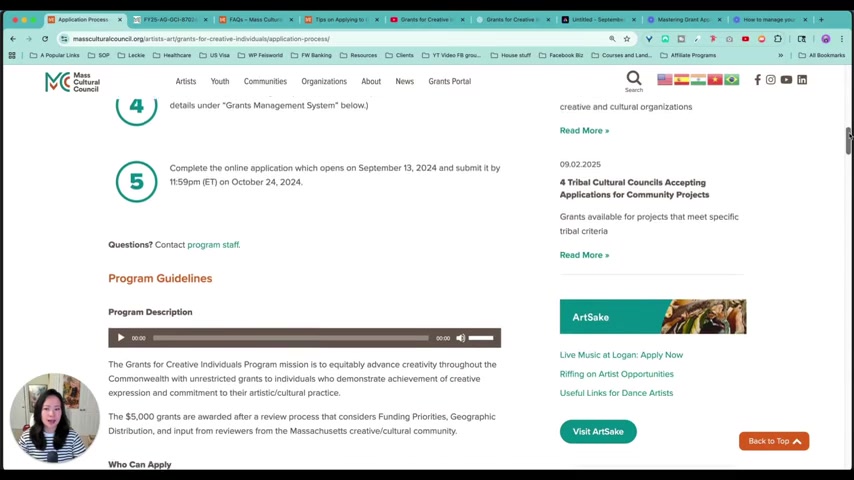
In 2024, a user assisted their mother in applying for and winning the Massachusetts Cultural Council’s Creative Individual Grant. This type of grant can be complicated and overwhelming. Acrobat Studio will streamline this process from beginning to end.
Leveraging PDF Spaces in this process will create a central location to store all essential documents, guidelines, and related website links. Creating a personal AI assistant who knows everything about this specific grant allows for quick answers without searching through multiple documents for the same piece of information.
Seamless Integration with Adobe Express
Adobe Acrobat Studio doesn't just stop at document management; it extends its functionality through seamless integration with Adobe Express.
This integration allows you to transform insights gleaned from your documents into visually compelling infographics and social media assets, helping you to share information effectively. The ability to Translate data into easily digestible visual content can have widespread applications, enhancing the appeal of your project and reaching a broader audience.
Crafting a Personalized Knowledge Base: Tailoring Acrobat Studio to Your Needs
The Knowledge base Advantage
By feeding all relevant files and links, including recordings and transcripts of important sessions, you are building a comprehensive knowledge base. This curated collection of information allows the AI assistant to provide more accurate and insightful responses.
This approach provides you with a high level of personalization that caters to your specific needs.
Understanding Generative AI
PDF Space offers a powerful AI system with the capability to make your assistant have customized generative responses to any question. By dumping all the required information and data into the software, you allow a customized answer to arise when you ask questions.
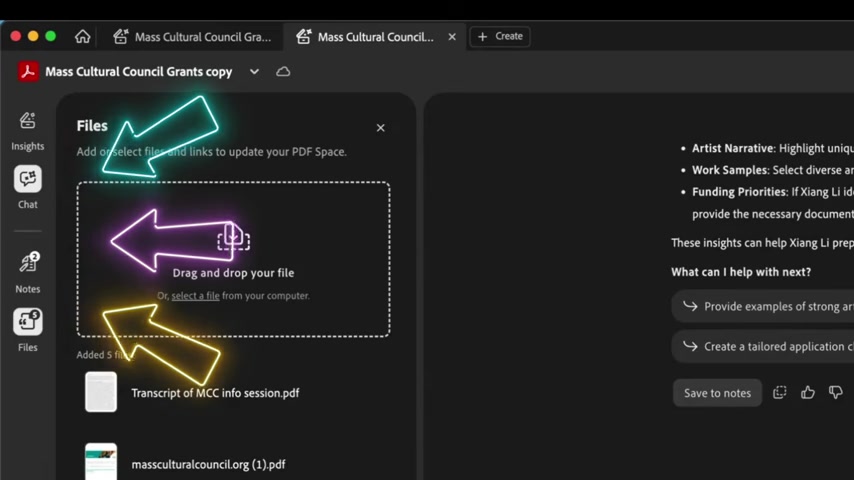
When you decide to set up your own space, you give it its own unique AI and knowledge base for the best answer possible. Acrobat Studio tailors your experience when answering the many queries you may come across.
Create Custom Social Media Content
One of the greatest new features to come to Acrobat Studio is the generative AI capabilities to create custom social media content. As social media becomes the single most powerful place to run advertisements and garner awareness of a company, it is only fair that new software is designed to help boost social media prowess.
Now, social media campaigns can be created directly from Adobe Acrobat Studio with the AI capabilities. The creation of new and useful content, specifically with graphics is now one of the most powerful tools to ever be included into this document system.







Most people like






























Report
Please select a reason for reporting
- 13 Reasons to Switch from Snapchat to Text Messaging
- 7 Powerful Speech to Text Apps to Boost Productivity
- 10 Best Speech to Text Tools for Effortless Transcription
- 13 Free Tools to Easily Transcribe Audio to Text
- 15 Surprising Ways Google's Speech-to-Text Boosts Productivity
- 7 Best Free Online Audio to Text Transcription Tools
- 9 Tips to Transcribe Speech to Text Faster and Better
- 13 Best Speech to Text Software for Windows 10 in 2023
- 7 Tips for Choosing the Best Transcriber for Audio to Text
- 11 Reasons Why Dragon Speech-to-Text Apps are Game-Changers
- 6 Secrets to Enhance Your Speech to Text Transcription
- 6 Brilliant Ways to Boost Productivity with Talk-to-Text on Your MacBook
- 6 Ways Transcription Software Converts Audio to Text
- 8 Tips to Transcribe Speech to Text Like a Pro
- 6 Reasons IBM Watson Speech to Text is a Game-Changer
- 14 Powerful Ways Talk-to-Text Improves Your Workflow
- 12 Top Windows Speech-to-Text Software for Efficient Transcription
- 12 Game-Changing Benefits of Apple's Speech to Text Technology
- 9 Powerful Use Cases for AWS Speech to Text Technology
- 10 Easy Steps to Transcribe YouTube Videos to Text
- transcription audio en texte
- online audio transcription
- free audio file transcription
- free ai audio transcription
- audio transcription service
- audio transcription online free
- audio transcription free online
- audio to transcription software
- audio and transcript
- ai audio transcription free
- voice recording to text converter
- translate voice recording to text
- record voice to text
- audio recording to text converter
- voice recording and transcription
- chatgpt voice to text
- gmail voice to text
- speech to text reader
- speech to text ai free
- speech to talk
- How SEO and Marketing Dashboards Empower Agencies to Drive Results
- How to Use AI Tools to Find Internal Linking Opportunities Across a Business Website
- Discover Your Perfect Haircut with AI Hairstyle Apps
- Free Reputation Calculator Tools: How They're Adapting to Score AI Visibility, Not Just Rankings
- Design Professional Flyers for Free on Your Phone
- Best Free Flyer Maker Apps for Android: Design Like a Pro
- How to Know If Your Business Is Ready for an AI Customer Service Agent
- Revolutionizing Storytelling: From Novels to Screenplays with AI
- Create Engaging Animated Explainer Videos with a Free AI Tool
- Stop Multi-Subscribing: Benchmark Top AI Visual Models in One Canvas
- ASOMobile Helps Teams Benchmark App Store Screenshots Against Competitors
- How to Match LMS Software With Your Organization's Training Plan
- Revolutionizing Email Marketing Agency with AI
- How to Convert BTC to HNT
- Unleashing the Power of AI: Cognizant's Roadmap for Transformation
- Frame to Video Review: A Practical Look at Turning Two Still Frames Into Motion
- NVIDIA NIM: Revolutionizing Supply Chain Data Analysis with AI
- Top AI Tools That Help Brands Stand Out Offline (Not Just Online)
- Top 5 Cold Email Software: Maximize Your Outreach in 2025
- Magic School AI: Revolutionizing Quiz & Assessment Generation

Copyright ©2026 toolify