































Table of Contents
- Key Points
- Revolutionary Open-Source Projects Trending on GitHub
- Setting Up the Code
- How to Use Hunyuan Image 3.0
- Pricing of Hunyuan Image 3.0
- Weighing the Options: Pros and Cons of Open-Source Projects
- Hunyuan Image 3.0: Core Features
- Hunyuan Image 3.0: Use Cases
- Frequently Asked Questions (FAQ)
- Related Questions


Revolutionary Open-Source Projects Trending on GitHub
Hunyuan Image 3.0: AI-Driven Multimodal Image Generation
The Hunyuan Image 3.0
project stands out as a unified, multimodal image generation model enhanced with world-reasoning capabilities. This open-source initiative is pushing the boundaries of what's possible in AI-driven image generation. It uniquely blends multimodal understanding and generation into a single, cohesive model. Unlike traditional approaches where text and images are treated as separate modules, Hunyuan Image 3.0 deeply analyzes both language and visuals simultaneously. This allows for the creation of image outputs that possess both semantic depth and visual coherence. This innovation enables the model to interpret prompts with greater accuracy and generate images that closely align with the user's intent.
One of the standout features of Hunyuan Image 3.0 is its scale and architecture. The model employs a Mixture of Experts (MoE) approach, featuring 64 experts and a total of 80 billion parameters. However, only 13 billion parameters are activated per token during inference, making it efficient even at a massive scale. This architectural choice enables high-quality image generation without excessive computational waste. Essentially, it provides tools that are both powerful and economically viable. With the official technical report and open-source release of its inference code and model weights, Hunyuan Image 3.0 is an invaluable tool for researchers and developers exploring advanced image generation techniques.
The unified autoregressive design translates to a model that doesn't just render text into images, but grasps the nuances, context, and world knowledge embedded within prompts. This ensures that even sparse prompts are intelligently fleshed out in the visual output. Furthermore, it effectively handles long and complex text instructions, supporting thousands of characters. Combined with strong text rendering capabilities within images, this allows for labels, captions, multilingual text, and graphic elements to be incorporated more faithfully. This capability offers users creative freedom and semantic precision. It offers a potent blend of semantic depth and visual fidelity for diverse image generation needs. It also allows both language and images to be deeply reasoned about, simultaneously creating image outputs with semantic accuracy.
Claude Agent SDK: Empowering AI with Tools, Memory, and Real-World Action
The Claude Agent SDK
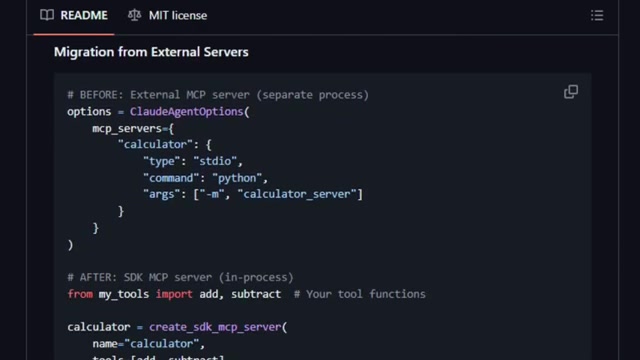
for Python is not just an API wrapper; it's a transformative tool that converts a standard AI chat into an intelligent, context-aware agent capable of interacting with the real world. This SDK allows developers to equip Claude, an AI assistant, with the ability to use tools, remember context, and perform real-world actions. This empowers AI to do practical tasks.
Agents developed with this SDK can tap into various resources, such as file systems and custom tools, enhancing their utility. Unlike traditional Prompt-and-response interactions, these agents can actively engage with their environment, reading files, invoking custom logic, and interacting with external systems. This capability streamlines workflows and enables AI to perform more complex tasks autonomously. The stand-out feature of the Claude Agent SDK is its support for custom tools and multi-context protocol (MCP) integration. This makes it simpler for developers to integrate Claude with their existing systems and applications. Python functions can be declared as callable tools, allowing Claude to invoke them during conversations. A simple import allows instant usage, minimizing coding overhead.
Key features include:
- The ability to read and modify files, improving document management and processing.
- The ability to use Custom Tool, which is a Python function that can offer to Claude, for Claude to invoke as needed.
- Streaming interfaces for natural conversations, providing a more seamless and interactive experience.
- Maintaining multi-turn context for better Workflow Management and task continuity.
Rather than sending prompts and passively awaiting responses, agents built with this SDK can tap into things like file systems, custom tools, hooks and extended conversations with memory. That means your AI can do real work. reading files, invoking custom logic or interacting with external systems without you having to glue everything together. It has a built in support for custom tools and MCP integration. The SDK supports asynchronous streaming interfaces so the agent can talk back in chunks, and you can respond as it's thinking, not just at the end. There's less magic happening behind the scenes. The result is a more seamless workflow that leverages AI's capabilities within existing systems.
Electron: Powering Desktop Apps with Web Simplicity
Electron
is an open-source framework that bridges the gap between web and desktop applications. It enables developers to build native desktop applications using web technologies like HTML, CSS, and JavaScript. It is an essential tool for creating desktop applications using a language that most developers already know how to use.
Electron makes developing for Mac OS, Windows and Linux more manageable. Rather than forcing you to learn a new native framework for Windows, Mac OS or Linux, Electron gives you one unified platform that works across them all. Using HTML, CSS and Javascript web developers will immediately feel at home and won't need to invest in different, native based, resources.
Electron stands out because it merges the worlds of web and desktop, allowing developers to leverage their existing web development skills to create powerful desktop applications. Key features are the chromium browser engine and node.js. This powerful combination brings both rich UI and deep system access at the same time. Build interactive interfaces, use web libraries, and still read files, talk to hardware, manage processes, or perform local operations.
Instead of juggling different apps for launching, searching, browsing, calculating or chatting, Walker puts them all under one roof with smart prefixes and a clean UI. It enables a lot of modern javascript tools like visual studio code, slack, discord etc. While it can be memory intensive, since the code needs to bundle chromium and Node, developers have made progress over the year to optomize performance, modulatory and auto updates. All of these things reduce friction for both developers and users.
JSCamp InfoJobs: Full-Stack JavaScript Bootcamp with Real-World Applications
JSCamp InfoJobs
isn't just another Tutorial series; it's a full-stack JavaScript bootcamp designed to transform beginners into proficient full-stack developers. The reason that JSCamp Infojobs stands out is because instead of teaching basic JavaScript concepts, It provides a project based boot camp that goes step by step all the way to advanced full stack development. The holistic approach to JS Camp makes it one of a kind. Each module adds a new technology or concept, and you build parts of a live project along the way.
Instead of isolated lessons on HTML, CSS, or React, JSCamp weaves them together. You'll see how front-end and back-end systems connect, how state flows, how deployment works, and how everything ties into a full application you can show off. It also avoids jumping randomly from topic to topic, Each lesson build on the previous one letting you gradually layer in complexity. The result ensures a learning environment that blends into real world application design.
Plus it's community driven and free to access. The content is openly available and as the boot camp evolves, it's materials update in public view. This transparency means you can follow at your own pace, and see real world progression as the Course evolves. With this boot camp you'll not only be learning tools, but a real workflow from idea to delivery.
Walker: The All-in-One Linux Launcher That Thinks For You
Walker
is not just any application launcher, it's a supercharged, multipurpose assistant designed for Linux desktops using GTK4. Walker is different because its the all in one launcher with a lot of features, and provides a modern interface for launching applications, running commands, and performing calculations.
The unique advantage of walker is the amount of provider types or modes that it offers. That includes commands, programs, browsers, running terminal or accessing your clipboard. All of these can be performed with optimized speed so it always performs efficiently and at a scale that is efficient. Each of these options can be controlled with custom built keyboard shortcuts that are easy to manage. This makes it intuitive for a wide range of applications. The versatility of the framework is also important because developers don't need to keep re-integrating common commands and applications.
For example, for a web search it can use + as a prefix and with different configurations for different applications you only have to do setup once. To top it off it also connects to elepant its data back end so it can dynamically list the app, command and providers installed in you system. With that integration it lets you maintain multi term context, keep memory across exchanges and let you configure what tools and behaviours that agents can use.
Solid: Fine-Grained Reactivity Meets Real-DOM Efficiency in Web Frameworks
SolidJS
is not just another JavaScript framework. It redefines how reactive UIs should work. In contrast with virtual DOM libraries like React, SolidJS focuses on updates to the real DOM instead of the virtual DOM. With benchmarks indicating that solid is among the fastest, modern UI frameworks, there are some solid reasons for using this option.
Instead of treating each component as its own element that re renders over and over again, solid treats component as something that is only executed once to setup the view. The performance is also great because with it there's no virtual Dom diffing as it is constantly diffing. Finally, when everything stays light, the memory usage and CPU foot print stays very low and under control. The framework also has many modern features including server side rendering and tree shaking.
For developers, because solid has a naturally debuggable structure it's really easy to develop, implement and reason about changes. With no virtual DOM the overhead of comparing DOM states is eliminated. The result is that Solid is highly performant and a high contender of a UI framework.
qrcode.react: Effortless QR Code Generation in React Applications
The qrcode.react excels in the creation of QR codes. Unlike other packages or image APIs, qrcode.react seamlessly manages your requirements. To get started, drop the component, put your text or URL inside and it generates a responsive image using SVG or Canvas. The result is a no clutter QR generator.
With QRcode.react integration to react has never been smoother. It Sports features like generating in svg/canvas, minimal configuration and built in type script support. That blend provides an intuitive way to implement the framework as soon as its installed. Other benefits include, error correction, sizing, margins, and other QR code niceties under the hood. QRcode abstracts the work so you can focus on important things. All of these small features add a level of freedom when working that is a plus in modern programming.
TradingAgents-CN: AI Trading Framework with Chinese Market Support
TradingAgents-CN emerges as a refined and highly localized version of the multi-agent AI trading framework, offering crucial upgrades specifically targeted at investors within China, Hong Kong, and the broader global markets. This tool provides analysis capabilities to A-shares, Hong Kong stocks and US stocks. By offering tailored solutions for the chinese stock markets trading agents is not only easier to navigate within chinese markets, but allows for better investment decisions.
Trading Agents builds itself around a multi-agent architecture that breaks down trading into different specialized roles. the architecture consists of : fundamental analysts, sentiment analysts and technical analysts, and a core trader that merges insights. It also provides a flexible means of using this code. Since the tool uses Apache licensing the tool is very adaptable and can be deployed in commercial capacities. It also comes with Open AI and Google AI as options. All of these things can be changed from a convenient panel.
The CN Edition also incorporates powerful elements beyond base trading functionality. For example. you get integrated localization elements for the Chinese community
Stremio Web: Centralized Media Interface and Centralized Streaming
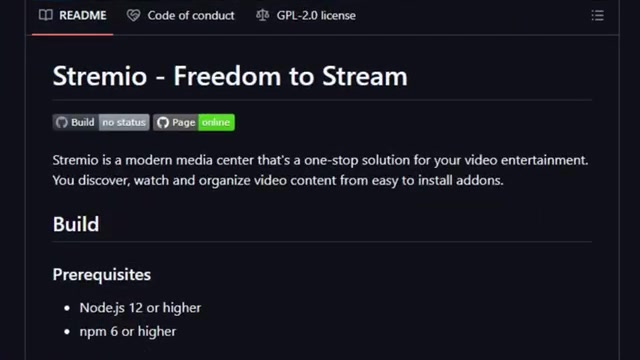
Stremio Web is different because it delivers a multi media approach with a browser based interface that unifies all media sources and streaming channels under one roof. Instead of juggling sites, and app stremio lets you use auto discovery to watch, discover and and manage videos under one unified inter face. The UI is clean and makes it easy to find new content. Users will also find recommendations that provide meta data, casting, and options that let you dive deeper. All of that in a browser.
But the real advantage is add ons. With the framework users can install third party features that can connect streaming services, recommendations. This means that every user, no matter their service, gets a personalized integration and recommendation. All of the services can be switched instantly from any browser. By being web based users get a zero hassle setup meaning they can install without any complicated installations.





Most people like



































Report
Please select a reason for reporting
- 13 Reasons to Switch from Snapchat to Text Messaging
- 7 Powerful Speech to Text Apps to Boost Productivity
- 10 Best Speech to Text Tools for Effortless Transcription
- 13 Free Tools to Easily Transcribe Audio to Text
- 15 Surprising Ways Google's Speech-to-Text Boosts Productivity
- 7 Best Free Online Audio to Text Transcription Tools
- 9 Tips to Transcribe Speech to Text Faster and Better
- 13 Best Speech to Text Software for Windows 10 in 2023
- 7 Tips for Choosing the Best Transcriber for Audio to Text
- 11 Reasons Why Dragon Speech-to-Text Apps are Game-Changers
- 6 Secrets to Enhance Your Speech to Text Transcription
- 6 Brilliant Ways to Boost Productivity with Talk-to-Text on Your MacBook
- 6 Ways Transcription Software Converts Audio to Text
- 8 Tips to Transcribe Speech to Text Like a Pro
- 6 Reasons IBM Watson Speech to Text is a Game-Changer
- 14 Powerful Ways Talk-to-Text Improves Your Workflow
- 12 Top Windows Speech-to-Text Software for Efficient Transcription
- 12 Game-Changing Benefits of Apple's Speech to Text Technology
- 9 Powerful Use Cases for AWS Speech to Text Technology
- 10 Easy Steps to Transcribe YouTube Videos to Text
- transcription audio en texte
- online audio transcription
- free audio file transcription
- free ai audio transcription
- audio transcription service
- audio transcription online free
- audio transcription free online
- audio to transcription software
- audio and transcript
- ai audio transcription free
- voice recording to text converter
- translate voice recording to text
- record voice to text
- audio recording to text converter
- voice recording and transcription
- chatgpt voice to text
- gmail voice to text
- speech to text reader
- speech to text ai free
- speech to talk
- How to Use AI Tools to Find Internal Linking Opportunities Across a Business Website
- Discover Your Perfect Haircut with AI Hairstyle Apps
- Free Reputation Calculator Tools: How They're Adapting to Score AI Visibility, Not Just Rankings
- Design Professional Flyers for Free on Your Phone
- Best Free Flyer Maker Apps for Android: Design Like a Pro
- How to Know If Your Business Is Ready for an AI Customer Service Agent
- Revolutionizing Storytelling: From Novels to Screenplays with AI
- Create Engaging Animated Explainer Videos with a Free AI Tool
- Stop Multi-Subscribing: Benchmark Top AI Visual Models in One Canvas
- Best Seedance 2.5 API Provider: Every Price on the Market, Checked at Source
- Top AI Social Media Management Tools: Automate Your Content Strategy
- Free AI Text to Video Generator: Create Stunning Videos from Text
- Discover 17 ChatGPT Alternatives: A Comprehensive Comparison
- Character.AI vs. Janitor AI: Which AI Chat Platform Reigns Supreme?
- Top Virtual Assistant Companies in 2026: Reviews, Pricing, and Plans Compared
- Unveiling FaceCheck.ID: Revolutionizing Reverse Image Searches with AI
- 11 Best AI Dialers in 2026: Features, Pricing, Pros and Cons
- How I Direct Consistent AI Clips: A Hands-On Guide to Multi-Model Generation
- A Realistic Review of the Photo Generator Image Tool
- Playwright MCP Server: Automated Web Testing with Agent Mode

Copyright ©2026 toolify