Sponsored by
iMean AI Trip Planner



ChatGPT Share - Chrome Extension
5
1 Reviews
0 Saved
Introduction:
Extension to save and share ChatGPT conversations as Markdown and PNG files.
Updated Time
May 22 2023
Active Users
137

APIMart
AI API, 99.9% SLA. Your AI, Always On.

PoYo.AI
High concurrency. Stable AI API. Better pricing.

iMean AI Trip Planner
AI trip planner that creates personalized itineraries, finds cheap flights and hotels, and helps you plan an entire trip in one chat.

Free
APIMaster
GPT up to 95% off + $20 trial. Fingerprint-verified APIs. Low-cost and stable.

YouArt
Agentic Creative OS

ChatGPT Share AI Chrome Extension Information
What is ChatGPT Share ai chrome extension?
ChatGPT Share is a powerful extension designed to help users save, manage, and share their ChatGPT conversations effortlessly. It allows users to convert ChatGPT conversations into Markdown and PNG image files, making it easy to store, revisit, and share valuable AI-generated content.
How to use ChatGPT Share ai chrome extension?
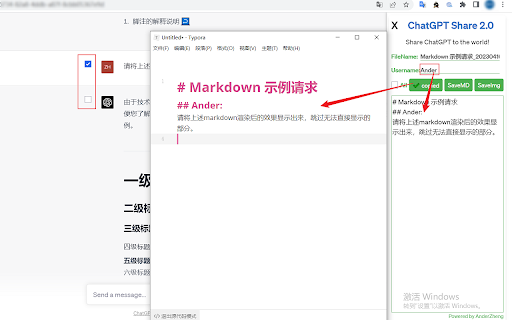
Install the ChatGPT Share extension. Open a ChatGPT conversation on a supported site (chat.openai.com, freegpt.one, medium.com, etc.). The extension provides options to save the conversation as Markdown or PNG. Customize the filename and username (for Markdown). Click the appropriate button to save or copy the content.
ChatGPT Share ai chrome extension's Core Features
Convert ChatGPT conversations to Markdown format with one-click copy and download.
Convert ChatGPT conversations to PNG image format with one-click download.
Customizable username when saving as Markdown for enhanced privacy.
Customizable filename for both Markdown and PNG files.
Ability to select and convert specific parts of conversations.
ChatGPT Share ai chrome extension's Use Cases
#1
Saving important ChatGPT conversations for future reference.
#2
Sharing ChatGPT interactions with others in a readable format.
#3
Creating documentation or reports based on ChatGPT outputs.
#4
Archiving valuable AI-generated content.
FAQ from ChatGPT Share
What should I do if the icon doesn't respond when clicked?
Why does it take so long to generate the picture?
Can I save conversations generated after opening the extension?
What should I do when switching conversations?
PostMcpAi
AI-powered social media publishing across seven networks
Try Now
AD
Agentkit
AI agents trained on business content for support, lead capture, and automation
Try Now
AD
Analytic of ChatGPT Share AI Chrome Extension
ChatGPT Share Active Users
Total Installed User
137 (14)
