Sponsored by
APIMart



AI Assistant Chrome Extension - Chrome Extension
4.7
7 Reviews
0 Saved
Introduction:
AI-powered Chrome extension for enhanced browsing and productivity.
Updated Time
Dec 13 2024
Active Users
189

Nextbrowser
Automate logins, scraping, outreach, and more — just by chatting with AI.

Clico
AI assistant that brings writing, summarization, and search to every browser text box.

APIMaster
GPT up to 95% off + $20 trial. Fingerprint-verified APIs. Low-cost and stable.

iMean AI Trip Planner
AI trip planner that creates personalized itineraries, finds cheap flights and hotels, and helps you plan an entire trip in one chat.

Free
APIMart
AI API, 99.9% SLA. Your AI, Always On.

AI Assistant Chrome Extension AI Chrome Extension Information
What is AI Assistant Chrome Extension ai chrome extension?
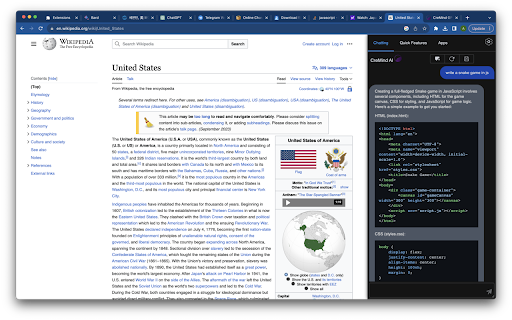
This Chrome extension harnesses AI/GPT technology to enhance browsing with intelligent features. It offers functionalities like AI-powered chat, dictionary lookup, content generation, summarization, language translation, grammar revision, interview question generation, code explanation, and text paraphrasing. While free for ChatGPT/Claude/Google Gemini account holders, stability isn't guaranteed due to potential policy changes by these platforms.
How to use AI Assistant Chrome Extension ai chrome extension?
The service is free for ChatGPT, Claude, or Google Gemini account holders. Ensure you are logged in. Use Cmd+Shift+Z (MacOS) or Ctrl+Shift+Z (Windows) to activate.
AI Assistant Chrome Extension ai chrome extension's Core Features
Chat with AI Assistant Everywhere
Dictionary Lookup
Content Generation
Summarize Content/Document
Language Translation
Grammar Revision
In-depth Grammar Explanation
CV-Driven Interview Question Generation
Code Explanation
AI-Powered Text Paraphrasing
AI Assistant Chrome Extension ai chrome extension's Use Cases
#1
Chat with an AI assistant while browsing any website.
#2
Quickly look up word definitions and usage examples.
#3
Generate content for various topics automatically.
#4
Summarize long articles or documents for quick understanding.
#5
Translate text into different languages with natural-sounding results.
#6
Revise grammar and improve writing quality.
#7
Generate interview questions based on a candidate's CV.
#8
Understand code snippets in different programming languages.
#9
Paraphrase text to avoid plagiarism and improve clarity.
FAQ from AI Assistant Chrome Extension
Is the Chrome extension free to use?
What do I need to use the extension?
Is the extension stable?
PoYo.AI
High concurrency. Stable AI API. Better pricing.
Try Now
AD
YouArt
Agentic Creative OS
Try Now
AD
Analytic of AI Assistant Chrome Extension AI Chrome Extension
AI Assistant Chrome Extension Active Users
Total Installed User
189