



Lanter: YouTube Highlighter - Chrome Extension


What is Lanter: YouTube Highlighter ai chrome extension?
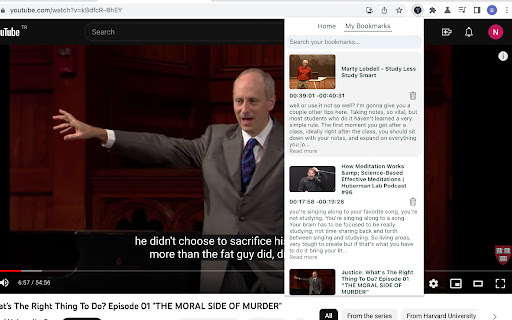
Lanter: YouTube Highlighter is a Chrome extension designed to enhance the YouTube experience by allowing users to capture, highlight, and review key moments from videos. It uses AI and ML to transcribe and format video content into easily readable highlights. Users can bookmark crucial moments with punctuated and formatted text for later review and study.
How to use Lanter: YouTube Highlighter ai chrome extension?
Install the Chrome extension. While watching a YouTube video, click the extension button to capture the text at the current timestamp. The text is automatically punctuated and formatted. Bookmark the highlighted text and timestamp for later review. Use the search function to find specific highlights.
Lanter: YouTube Highlighter ai chrome extension's Core Features
Effortless Text Capture
Advanced AI and ML Punctuation
Bookmark and Organize
Automatic Daily Email Reminders
Comprehensive Search
Lanter: YouTube Highlighter ai chrome extension's Use Cases
Students can use it to highlight key concepts in educational videos for later study.
Professionals can use it to capture important information from webinars or tutorials.
Researchers can use it to bookmark relevant sections of research videos.
FAQ from Lanter: YouTube Highlighter
How does Lanter capture text from YouTube videos?
Does Lanter work with all YouTube videos?
How do I access my saved bookmarks?
Analytic of Lanter: YouTube Highlighter AI Chrome Extension
Lanter: YouTube Highlighter Active Users
Total Installed User
Alternative of Lanter: YouTube Highlighter AI Chrome Extension

More Content About Lanter: YouTube Highlighter
10 Easy Steps to Transcribe YouTube Videos to Text
By Hitesh Sant on August 18 2024
Unlock the Secrets: Transcribe YouTube Videos in 10 Simple Steps!