Sponsored by
iMean AI Trip Planner



ChatGPT Placeholder Chrome Extension - Chrome Extension
0
0 Reviews
0 Saved
Introduction:
Chrome extension for automatic placeholder text insertion in ChatGPT.
Updated Time
Jul 17 2023
Active Users
4

iMean AI Trip Planner
AI trip planner that creates personalized itineraries, finds cheap flights and hotels, and helps you plan an entire trip in one chat.

Free
PoYo.AI
High concurrency. Stable AI API. Better pricing.

APIMaster
GPT up to 95% off + $20 trial. Fingerprint-verified APIs. Low-cost and stable.

Agentkit
AI agents trained on business content for support, lead capture, and automation

Anathema AI
▎ Anathema is an AI chat platform built around Lexi, an assistant with personality. She is bubbly, a little aloof, gives you a straight answer, and does not hedge everything into uselessness. Alongside chat, Anathema includes a full generation Studio for images, video, music and voice, running state of the art models. An API is available for Lexi and Ana.

ChatGPT Placeholder Chrome Extension AI Chrome Extension Information
What is ChatGPT Placeholder Chrome Extension ai chrome extension?
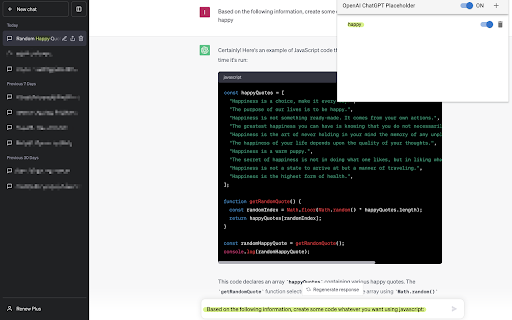
The ChatGPT Placeholder Chrome Extension is a tool designed to save time and effort by automatically inserting placeholder text into the ChatGPT input box based on user-defined settings. This eliminates the need to repeatedly type the same text, streamlining the ChatGPT experience.
How to use ChatGPT Placeholder Chrome Extension ai chrome extension?
1. Install the extension and refresh the ChatGPT page. 2. Click the extension button to open the interface. 3. Add a new item using the plus button. 4. Click the new item in the list. 5. Enter the title you want to target (case-insensitive matching). 6. Ensure both the main switch and the item-specific switch are turned on.
ChatGPT Placeholder Chrome Extension ai chrome extension's Core Features
Automatic placeholder text insertion
Case-insensitive title matching
Easy-to-use interface
Customizable placeholder text for different chat titles
ChatGPT Placeholder Chrome Extension ai chrome extension's Use Cases
#1
Automatically insert common greetings or prompts in ChatGPT conversations.
#2
Quickly populate input fields with frequently used code snippets or text templates.
FAQ from ChatGPT Placeholder Chrome Extension
How do I install the ChatGPT Placeholder Chrome Extension?
How do I add a new placeholder?
How do I enable a placeholder?
What if I encounter issues or have suggestions?
Teammates.ai
AI-powered customer service, sales, and lead generation solutions.
Try Now
AD
Sup AI
Sup AI is the world's most accurate AI orchestration platform, combining 9 frontier LLMs with proprietary synthesis technology to deliver hallucination-free, verifiable responses for mission-critical decisions.
Try Now
AD
Analytic of ChatGPT Placeholder Chrome Extension AI Chrome Extension
ChatGPT Placeholder Chrome Extension Active Users
Total Installed User
4
Alternative of ChatGPT Placeholder Chrome Extension AI Chrome Extension
Website
Free
AI ChatbotAI AssistantAI Writing AssistantsAI Grammar CheckerAI TranslateAI SummarizerAI Caption GeneratorAI Email WriterAI Meme GeneratorAI Story GeneratorAI Code Generator
Open site
 100.00%
--
100.00%Direct (38.29%)
SearchOrganic (36.43%)
Referrals (9.08%)
