Sponsored by
Crazyrouter



PinMyPrompt - Chrome Extension
0
0 Reviews
0 Saved
Introduction:
Chrome Extension to pin ChatGPT links to web pages for easy access.
Updated Time
Aug 22 2023
Active Users
12

iDox.ai Guardrail
Real-time AI guardrails that prevent sensitive data exposure in AI tools, copilots, and autonomous AI agents.

Maxworker.ai
Max is an AI coworker for your team inside Slack. He connects to 25+ essential work tools today, with 3,000+ tools coming soon, and turns your team’s context into ready-to-review work. Fixed price, no surprise.

Miro
AI innovation Workspace

Runable
Runable is a general AI agent that can execute any task, from building web apps, slides, reports, and documents to generating images, videos, and podcasts, all in one place. It doesn’t just create it connects. Runable integrates with thousands of your favorite apps so you can simply ask it to do the work for you.

Nextbrowser
Automate logins, scraping, outreach, and more — just by chatting with AI.

PinMyPrompt AI Chrome Extension Information
What is PinMyPrompt ai chrome extension?
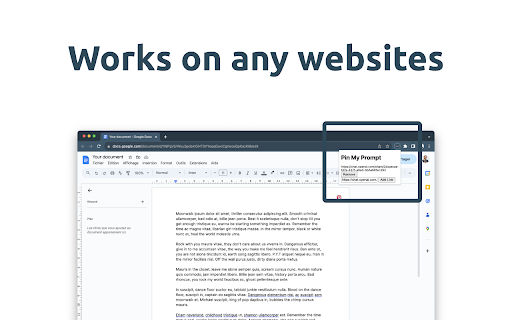
PinMyPrompt is a Chrome Extension designed to help users organize their ChatGPT conversations by pinning ChatGPT links to specific web pages, such as Google Docs or blog posts. This allows users to easily revisit and contextualize past chats right where they need them, making it a go-to tool for managing and accessing ChatGPT conversations in context.
How to use PinMyPrompt ai chrome extension?
1. In ChatGPT: Click the top right icon to copy your conversation link. 2. Go to Your Work: This could be Google Docs, Sheets, a social media post, WordPress, or any other site. 3. Click PmP: You'll find this on your browser's top bar. 4. Paste & Save: Put the link in, click "Add link", and you're done!
PinMyPrompt ai chrome extension's Core Features
Easy Access Icon: Discreet icon at the top right of your browser for quick access to pinned links.
Simple URL Pinning: Pin ChatGPT prompt URLs to web pages with a single click.
Hassle-Free Link Management: Edit, erase, or jump directly into pinned prompts from the dropdown list.
Smart Notifications: Receive notifications when visiting a page with saved links.
Exclusion List Flexibility: Manage an exclusion list to specify where the extension should not be active.
PinMyPrompt ai chrome extension's Use Cases
#1
Organizing research notes in Google Docs by linking to relevant ChatGPT conversations.
#2
Contextualizing blog posts with the ChatGPT prompts used for research and writing.
#3
Managing social media content creation by linking to the ChatGPT conversations that generated ideas and drafts.
FAQ from PinMyPrompt
How do I pin a ChatGPT prompt to a web page?
Can I edit or delete pinned links?
How do I exclude a website from PinMyPrompt?
PaioClaw
Managed, secure platform for deploying and automating OpenClaw AI assistants in 60 seconds.
Try Now
AD
Flowith 2.0
AI Creation Workspace for knowledge transformation and collaboration with AI models.
Try Now
AD
Analytic of PinMyPrompt AI Chrome Extension
PinMyPrompt Active Users
Total Installed User
12 (3)
Alternative of PinMyPrompt AI Chrome Extension

Website
Free Trial
Paid
Contact for Pricing
AI WorkflowAI MarketingAI AgentAI CopilotLarge Language Models (LLMs)AI Data MiningAI Image GeneratorAI Research ToolAI Digital MarketingAI Ad GeneratorAI Email GeneratorAI Text GeneratorAI Web Scraping
Open site
 24.95%
18.3K
24.95%Direct (40.63%)
SearchOrganic (32.48%)
Referrals (10.22%)