Sponsored by
APIMart



Secoda - Chrome Extension
5
1 Reviews
0 Saved
Introduction:
Secoda enhances data discovery and collaboration within BI and data warehouse tools.
Updated Time
May 20 2026
Active Users
250

iDox.ai Guardrail
Real-time AI guardrails that prevent sensitive data exposure in AI tools, copilots, and autonomous AI agents.

Nextbrowser
Automate logins, scraping, outreach, and more — just by chatting with AI.

Qoder
Agentic coding platform for real software development with AI agents.

Free
Maxworker.ai
Max is an AI coworker for your team inside Slack. He connects to 25+ essential work tools today, with 3,000+ tools coming soon, and turns your team’s context into ready-to-review work. Fixed price, no surprise.

Chatbot App
Multi-Model AI Chat Platform that lets you switch between 30+ leading AI models instantly or run them side by side, including ChatGPT, Claude, Gemini, and more, all in one place.

Secoda AI Chrome Extension Information
What is Secoda ai chrome extension?
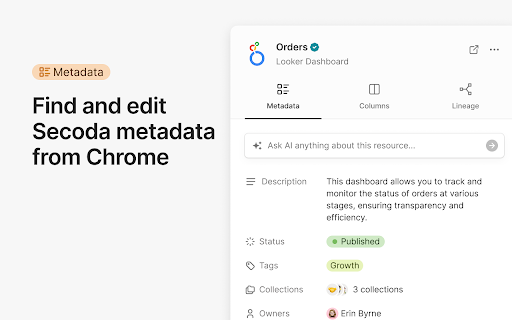
Secoda is a platform designed to enhance data discovery and collaboration within organizations. It allows users to find and edit metadata directly within popular BI and data warehouse tools like Looker, Tableau, Snowflake, and BigQuery. Secoda also provides access to resource lineage from these tools and enables users to start conversations and ask questions to Secoda AI. The platform is designed to be instantly accessible, even with multiple tabs open, and is packed with features to help teams work faster.
How to use Secoda ai chrome extension?
Secoda can be used by installing the browser extension. Once installed, users can find and edit metadata, access resource lineage, start conversations with Secoda AI, and search Secoda from any website.
Secoda ai chrome extension's Core Features
Metadata editing within BI and data warehouse tools
Resource lineage access
Secoda AI integration for questions and conversations
Universal search functionality
Secoda ai chrome extension's Use Cases
#1
Quickly find and understand data assets within your organization
#2
Collaborate with team members on data-related questions
#3
Maintain accurate and up-to-date metadata for data resources
#4
Trace the lineage of data to understand its origins and transformations
FAQ from Secoda
What tools does Secoda integrate with?
How do I access Secoda?
What can I do with Secoda?
Vmake Labs Video Enhancer
Vmake Labs Video Enhancer uses AI to improve video quality, restore details, reduce blur, and upscale videos to 8K.
Try Now
AD
APIMart
AI API, 99.9% SLA. Your AI, Always On.Most models offer cost savings of 20–60%; nanobanana pro api costs only 0.03.
Try Now
AD
Analytic of Secoda AI Chrome Extension
Secoda Active Users
Total Installed User
250 (-7)
Alternative of Secoda AI Chrome Extension
Website
Paid
Contact for Pricing
AI CopilotAI SalesAI Sales AssistantAI Lead GenerationAI Message Generator
Open site
--
Mail (0.00%)
GenAi (0.00%)
Direct (0.00%)
Open site
45 users
Website
Paid
AI CopilotAI Writing AssistantsAI Text GeneratorAI Image GeneratorAI Code GeneratorAI ChatbotAI Speech-to-TextAI Voice Over
Open site
--
Mail (0.00%)
GenAi (0.00%)
Direct (0.00%)