Sponsored by
APIMart



Shift-Ctrl-F - Chrome Extension
2.7
3 Reviews
0 Saved
Introduction:
Chrome extension using MobileBERT to search and highlight answers on webpages.
Updated Time
Sep 02 2020
Active Users
107
Browser Extension
Free
AI AnswerLarge Language Models (LLMs)Open Source AI ModelsAI Productivity Tools 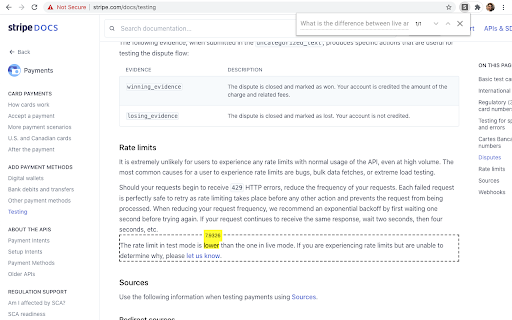

NewsBang
AI-powered news platform providing summaries, insights, and interactive podcasts.

Sup AI
Sup AI is the world's most accurate AI orchestration platform, combining 9 frontier LLMs with proprietary synthesis technology to deliver hallucination-free, verifiable responses for mission-critical decisions.

getsolved.ai
AI assistant for writing, research, and learning.

iMean AI Trip Planner
AI trip planner that creates personalized itineraries, finds cheap flights and hotels, and helps you plan an entire trip in one chat.

Free
APIMaster
GPT up to 95% off + $20 trial. Fingerprint-verified APIs. Low-cost and stable.

Shift-Ctrl-F AI Chrome Extension Information
What is Shift-Ctrl-F ai chrome extension?
Shift-Ctrl-F is a Chrome extension that uses MobileBERT fine-tuned on SQuAD via TensorFlowJS to search for answers and mark relevant elements on a web page. It allows users to type in a natural language query and find answers within the content of the current webpage.
How to use Shift-Ctrl-F ai chrome extension?
1) Open the extension popup via toolbar or shortcut (Shift-Ctrl-F). 2) Type in a natural language query into the search bar. 3) Press enter and wait for the model to return results.
Shift-Ctrl-F ai chrome extension's Core Features
Natural language question answering on webpages
Highlighting of relevant elements based on search query
Uses MobileBERT for efficient processing
Shift-Ctrl-F ai chrome extension's Use Cases
#1
Quickly find answers to specific questions within a webpage's content.
FAQ from Shift-Ctrl-F
What is Shift-Ctrl-F?
Where can I find the source code for Shift-Ctrl-F?
Are the search results always accurate?
APIMart
AI API, 99.9% SLA. Your AI, Always On.
Try Now
AD
PoYo.AI
High concurrency. Stable AI API. Better pricing.
Try Now
AD
Analytic of Shift-Ctrl-F AI Chrome Extension
Shift-Ctrl-F Active Users
Total Installed User
107
Alternative of Shift-Ctrl-F AI Chrome Extension
