Sponsored by
MenuForma



storageGPT - Chrome Extension
5
5 Reviews
0 Saved
Introduction:
A tool to save and manage ChatGPT conversations locally in Markdown format.
Updated Time
May 25 2026
Active Users
113

Nextbrowser
Automate logins, scraping, outreach, and more — just by chatting with AI.

Runable
Runable is a general AI agent that can execute any task, from building web apps, slides, reports, and documents to generating images, videos, and podcasts, all in one place. It doesn’t just create it connects. Runable integrates with thousands of your favorite apps so you can simply ask it to do the work for you.

Flowith 2.0
AI Creation Workspace for knowledge transformation and collaboration with AI models.

PaioClaw
Managed, secure platform for deploying and automating OpenClaw AI assistants in 60 seconds.

Decksy
AI presentation maker that creates researched, professional slides from topics, text, or uploaded documents.

storageGPT AI Chrome Extension Information
What is storageGPT ai chrome extension?
storageGPT is a tool designed to enhance the ChatGPT experience by allowing users to easily save their conversations and download them in Markdown format. It provides a convenient way to manage and store ChatGPT interactions locally, ensuring data security as no data is transmitted to a server.
How to use storageGPT ai chrome extension?
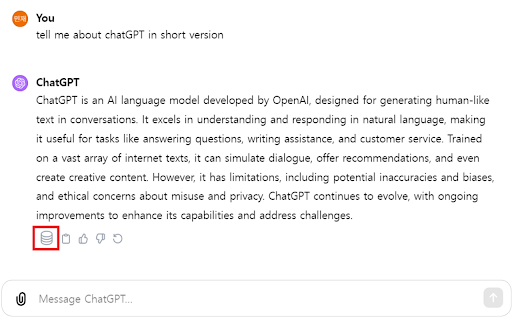
To use storageGPT, click the 'Save' button that appears under ChatGPT's responses to immediately save the conversation. Alternatively, use the keyboard shortcut 'Control + Shift + X' to quickly open the drawer where saved conversations are stored.
storageGPT ai chrome extension's Core Features
Save ChatGPT conversations
Download conversations in Markdown format
Keyboard shortcut for quick access
Local data storage for enhanced security
storageGPT ai chrome extension's Use Cases
#1
Saving important information discussed with ChatGPT for future reference
#2
Creating a personal knowledge base from ChatGPT conversations
#3
Archiving ChatGPT interactions for documentation purposes
#4
Sharing ChatGPT conversations with others in a readable format
FAQ from storageGPT
How do I save my ChatGPT conversations with storageGPT?
Is my data secure with storageGPT?
What format are the conversations saved in?
Velo
AI video infrastructure to explain, train, and sell faster.
Try Now
AD
ChatHawk
Find the Best Answer Across the Top AI Models
Try Now
AD
Analytic of storageGPT AI Chrome Extension
storageGPT Active Users
Total Installed User
113
Alternative of storageGPT AI Chrome Extension
Website
Free Trial
Contact for Pricing
AI Productivity ToolsAI Project ManagementAI Task ManagementAI AgentAI WorkflowAI SummarizerAI Writing AssistantsAI ChatbotAI MarketingAI RecruitingAI FormsAI Documents GeneratorAI For Data AnalyticsAI Email GeneratorAI Report GeneratorAI Grammar CheckerAI ParaphraserAI TranslateAI Search EngineAI Developer Tools
Open site
 19.55%
79.6K
19.55%Direct (51.21%)
SearchOrganic (42.28%)
Referrals (3.15%)
Website
Contact for Pricing
AI Productivity ToolsLarge Language Models (LLMs)AI Knowledge Management
Open site
 61.58%
30.0K
61.58%Mail (0.00%)
GenAi (0.00%)
Direct (0.00%)