Sponsored by
Vmake Labs Video Enhancer



Typee - A Browser Command Line - Chrome Extension
0
0 Reviews
0 Saved
Introduction:
Keyboard-first browser productivity tool for faster interaction with browser and AI.
Updated Time
Sep 30 2025
Active Users
14

ScholarSail
Connected AI study workspace for flashcards, mind maps, memory palaces, and focused planning

Decksy AI
AI presentation maker that creates researched, professional slides from topics, text, or uploaded documents.

Maxworker.ai
Max is an AI coworker for your team inside Slack. He connects to 25+ essential work tools today, with 3,000+ tools coming soon, and turns your team’s context into ready-to-review work. Fixed price, no surprise.

Velo
AI video infrastructure to explain, train, and sell faster.

Nextbrowser
Automate logins, scraping, outreach, and more — just by chatting with AI.

Typee - A Browser Command Line AI Chrome Extension Information
What is Typee - A Browser Command Line ai chrome extension?
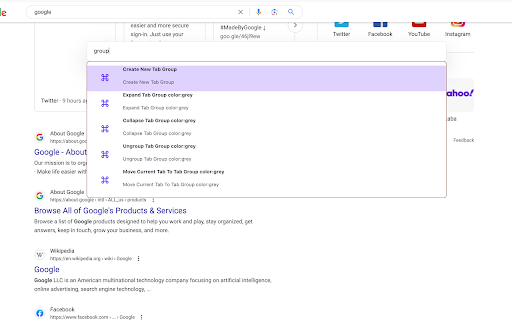
Typee Browser Extension is a keyboard-first productivity tool that helps you interact with your browser and AI faster and more efficiently. It acts as a browser command line, allowing you to manage tabs, tab groups, windows, and even interact with Twitter. It can be activated by pressing Shift + J, or customized to your preferred shortcut.
How to use Typee - A Browser Command Line ai chrome extension?
Install the Typee Browser Extension from the Chrome Web Store. Activate it using the default shortcut (Shift + J) or customize it in chrome://extensions/shortcuts. Then, use commands to manage tabs, windows, and other supported features.
Typee - A Browser Command Line ai chrome extension's Core Features
Tab management
Tab Group management
Window management
Twitter Interactive
Alias Management
Typee - A Browser Command Line ai chrome extension's Use Cases
#1
Quickly switch between tabs using keyboard commands.
#2
Group related tabs for better organization.
#3
Manage browser windows without using the mouse.
#4
Interact with Twitter directly from the command line.
#5
Create aliases for frequently used commands.
FAQ from Typee - A Browser Command Line
How do I activate Typee?
What features does Typee currently support?
What features are coming soon?
Runable
Runable is a general AI agent that can execute any task, from building web apps, slides, reports, and documents to generating images, videos, and podcasts, all in one place. It doesn’t just create it connects. Runable integrates with thousands of your favorite apps so you can simply ask it to do the work for you.
Try Now
AD
Flowith 2.0
AI Creation Workspace for knowledge transformation and collaboration with AI models.
Try Now
AD
Analytic of Typee - A Browser Command Line AI Chrome Extension
Typee - A Browser Command Line Active Users
Total Installed User
14 (1)
