



Warpdrive - Chrome Extension
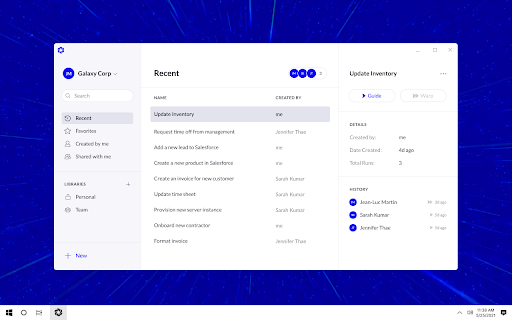





What is Warpdrive ai chrome extension?
Warpdrive instantly creates desktop and browser automations by learning from a single recording of your task. The Warpdrive extension connects your Chrome browser to the Warpdrive Desktop Application. You can open websites, native applications, and do whatever you would normally do on those inputs for your task. Warpdrive is intelligent enough to generalize your task so it saves you repeated work on your desktop, or you can share with your colleagues and they can run on their machines.
How to use Warpdrive ai chrome extension?
Start a new recording by specifying a starting URL, and optional inputs. Click record, and let Warpdrive observe as you do the task, which it will then immediately converts it into an intelligent automation. When you want to use the input data, click "Use" on the panel and Ctrl+V paste it as part of your task.
Warpdrive ai chrome extension's Core Features
Desktop and browser automation
Task recording and learning
Intelligent task generalization
Team collaboration and sharing
Warpdrive ai chrome extension's Use Cases
Automating repetitive data entry tasks
Automating web scraping workflows
Automating software testing processes
Automating report generation
FAQ from Warpdrive
How does Warpdrive create automations?
Can I share workflows with my team?
What do I need to use Warpdrive?
