































Table of Contents
- Key Points
- Why Choose Python for AI Development?
- Data Handling and Manipulation Basics for AI
- Building Your First Machine Learning Model
- Cost of Using Python and Google Colab for AI
- Python for AI: Weighing the Pros and Cons
- Python's Key Features for AI Projects
- Real-World Use Cases: Python in Action
- Frequently Asked Questions (FAQ)
- Related Questions


Why Choose Python for AI Development?
The Dominance of Python in AI
Python has become the dominant language in the field of Artificial Intelligence, and for good reason.

Its simplicity, readability, and extensive libraries make it an excellent choice for both beginners and experienced developers. Python's syntax is straightforward, making it easier to learn and use compared to other programming languages. This means you can focus more on the logic and algorithms of your AI projects rather than struggling with complex syntax.
Beyond its simplicity, Python boasts a rich ecosystem of libraries specifically designed for AI and machine learning. These libraries provide pre-built functions and tools that greatly simplify the development process. Let's take a closer look at some of the most important ones:
- NumPy: A fundamental library for numerical computing, providing support for large, multi-dimensional arrays and matrices, along with mathematical functions to operate on these arrays efficiently.
- Pandas: A library that offers data structures and data analysis tools, making it easy to manipulate and analyze structured data.
- TensorFlow: A powerful framework developed by Google for building and training machine learning models, especially deep learning models.
- PyTorch: Another popular machine learning framework, known for its flexibility and ease of use, particularly in research and development.
With just a few lines of Python code, you can analyze data, build sophisticated AI models, and even power chatbots and computer vision systems. This makes Python an incredibly versatile tool for a wide range of AI applications. For AI engineers, Python's versatility makes it an excellent option.
Setting Up Your Python Environment with Google Colab
To start working with Python for AI, you need a suitable development environment. Fortunately, Google Colab provides a free, online platform that is perfectly suited for this purpose.

Colab comes with Python and many essential AI libraries pre-installed, saving you the hassle of setting up your environment manually.
Here's why Google Colab is an excellent choice:
- Free Access: Colab is completely free to use, making it accessible to anyone with a Google account.
- Online Platform: As an online platform, Colab eliminates the need for local installations. You can access it from any computer with an internet connection.
- Pre-installed Libraries: Colab comes with Python and essential AI libraries like NumPy, Pandas, TensorFlow, and PyTorch already installed, saving you setup time.
- Easy to Use: Colab provides a user-friendly interface that is easy to navigate, especially for beginners.
To get started with Google Colab, simply visit colab.research.google.com. Once you're there, create a new notebook, and you're ready to begin coding. The steps are:
- Go to colab.research.google.com in your web browser.
- Sign in with your Google account.
- Click on 'New Notebook'.
Now that you have your coding environment, let's delve into some Python basics for AI.
Data Handling and Manipulation Basics for AI
The Fundamentals of Python Syntax and Data Handling
Before building complex AI models, it's important to understand the basics of Python syntax and data handling.
Python's clean and intuitive syntax makes it easy to manipulate data, which is the foundation of every AI system.
Let's start with a simple example. Suppose you want to calculate the mean (average) of an array of numbers. Here's how you can do it in Python using the NumPy library:
import numpy as np

data = np.array([10, 20, 30, 40])
mean = np.mean(data)
print("Mean:", mean)
This code snippet demonstrates several key concepts:
- Importing Libraries: The
import numpy as npstatement imports the NumPy library and assigns it the aliasnp, allowing you to use NumPy functions by prefixing them withnp.. - Creating Arrays: The
np.array()function creates a NumPy array from a list of numbers. - Calculating the Mean: The
np.mean()function calculates the mean of the array. - Printing Output: The
print()function displays the result.
Python’s simplicity means AI engineers can effectively manipulate and analyse data more easily.
Building Your First Machine Learning Model
Training a Simple AI Model with scikit-learn
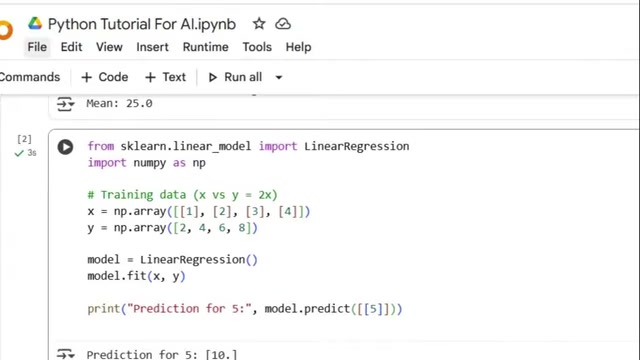
Now that you have a grasp of Python basics, let's train our first simple AI model using scikit-learn (also known as sklearn).
Scikit-learn is a popular machine learning library that provides a wide range of tools for building and evaluating models.
In this example, we'll create a simple linear regression model to predict the output based on the input data. Linear regression is a linear approach for modelling the relationship between a scalar response and one or more explanatory variables (also known as dependent and independent variables).
Here's the code:
from sklearn.linear_model import LinearRegression
import numpy as np

# Training data (x vs y = 2x)
x = np.array([[1], [2], [3], [4]])
y = np.array([2, 4, 6, 8])

# Create and train the model
model = LinearRegression()
model.fit(x, y)

# Make a prediction
prediction = model.predict([[5]])
print("Prediction for 5:", prediction)
Let’s break down the code:
- Importing the LinearRegression Class: The
from sklearn.linear_model import LinearRegressionstatement imports the LinearRegression class from scikit-learn. - Preparing the Data: The
xarray represents the input data, and theyarray represents the corresponding output data. In this case, we are creating a dataset where y is twice the value of x. - Creating the Model: The
model = LinearRegression()statement creates an instance of the LinearRegression class. - Training the Model: The
model.fit(x, y)statement trains the model using the training data. The fit method is used to learn the relationship between x and y. - Making a Prediction: The
model.predict([[5]])statement uses the trained model to predict the output for an input value of 5.
This code demonstrates how easy it is to build and train a machine learning model with Python and scikit-learn.
Real-World Use Cases: Python in Action
Revolutionizing Industries with Python-Powered AI
Python is not just a language for learning AI; it's a powerhouse behind countless real-world applications that are revolutionizing industries.
- Image Recognition: One of the most exciting applications of AI is image recognition. Python, combined with libraries like TensorFlow and Keras, can be used to build Image Recognition systems that can identify objects, faces, and even handwritten digits with remarkable accuracy.

These systems are used in a variety of industries, including security, Healthcare, and manufacturing. Imagine a security system that can automatically identify intruders or a medical system that can detect diseases from medical images.
- Chatbots: Chatbots are becoming increasingly common in Customer Service and virtual assistance. Python provides the tools to create interactive chatbots that can respond to user queries and provide personalized assistance. These chatbots can be integrated into websites, messaging apps, and even Voice Assistants.
- Data Visualization: AI is not just about building models; it's also about understanding data. Python's data visualization libraries, such as Matplotlib, make it easy to create insightful visualizations that help AI engineers understand patterns and trends in data. These visualizations can be used to identify anomalies, optimize performance, and make better decisions.
- Predictive Analytics: Python can be used to build predictive models that forecast future trends based on historical data. These models are used in finance, marketing, and supply chain management to make more informed decisions. Imagine a marketing system that can predict which customers are most likely to make a purchase or a supply chain system that can anticipate future demand.
These are just a few examples of the many ways Python is being used to drive innovation in AI. As AI continues to evolve, Python will undoubtedly remain a central tool for researchers, developers, and businesses alike.






Most people like





























Report
Please select a reason for reporting
- 13 Reasons to Switch from Snapchat to Text Messaging
- 7 Powerful Speech to Text Apps to Boost Productivity
- 10 Best Speech to Text Tools for Effortless Transcription
- 13 Free Tools to Easily Transcribe Audio to Text
- 15 Surprising Ways Google's Speech-to-Text Boosts Productivity
- 7 Best Free Online Audio to Text Transcription Tools
- 9 Tips to Transcribe Speech to Text Faster and Better
- 13 Best Speech to Text Software for Windows 10 in 2023
- 7 Tips for Choosing the Best Transcriber for Audio to Text
- 11 Reasons Why Dragon Speech-to-Text Apps are Game-Changers
- 6 Secrets to Enhance Your Speech to Text Transcription
- 6 Brilliant Ways to Boost Productivity with Talk-to-Text on Your MacBook
- 6 Ways Transcription Software Converts Audio to Text
- 8 Tips to Transcribe Speech to Text Like a Pro
- 6 Reasons IBM Watson Speech to Text is a Game-Changer
- 14 Powerful Ways Talk-to-Text Improves Your Workflow
- 12 Top Windows Speech-to-Text Software for Efficient Transcription
- 12 Game-Changing Benefits of Apple's Speech to Text Technology
- 9 Powerful Use Cases for AWS Speech to Text Technology
- 10 Easy Steps to Transcribe YouTube Videos to Text
- transcription audio en texte
- online audio transcription
- free audio file transcription
- free ai audio transcription
- audio transcription service
- audio transcription online free
- audio transcription free online
- audio to transcription software
- audio and transcript
- ai audio transcription free
- voice recording to text converter
- translate voice recording to text
- record voice to text
- audio recording to text converter
- voice recording and transcription
- chatgpt voice to text
- gmail voice to text
- speech to text reader
- speech to text ai free
- speech to talk
- Revolutionizing Storytelling: From Novels to Screenplays with AI
- Create Engaging Animated Explainer Videos with a Free AI Tool
- Stop Multi-Subscribing: Benchmark Top AI Visual Models in One Canvas
- Best Seedance 2.5 API Provider: Every Price on the Market, Checked at Source
- AI OnlyFans: How to Generate $30,000/Month (Legally)
- Transform Your Script into an Engaging Video with AI Video Maker!
- AI Marketing Automation: A Comprehensive Guide for Small Businesses
- Midjourney Alternative for Anime Art Creators: Why PixAI May Be Better for Character Workflows
- 10 Things Most People Get Wrong About AI Image Search
- AI Girlfriend Apps: Top Choices Redefining Relationships 2025
- Top 4 Face Swap Generator Tools to Transform Your Visual Content
- Master Canva's Video Background Remover with 5 Essential Tips
- Mastering Microsoft Stream: Video Management Tips & Tricks
- AI Video Generation: Extend AI Videos for Free
- Master Loom: Create and Share Professional Videos with AI
- Create Captivating AI News Videos: Step-by-Step Guide
- Create Your Own AI News Channel with AI-Powered News Video Generator and AI Lip Sync
- Unleash the Power of Heygen AI: Create Unlimited Videos for Free!
- Kapwing Smart Cut: AI Video Editing for Creators & Marketers
- Upscale Video Quality with UniFab Upscaler AI: A Complete Guide

Copyright ©2026 toolify