


AutoCut
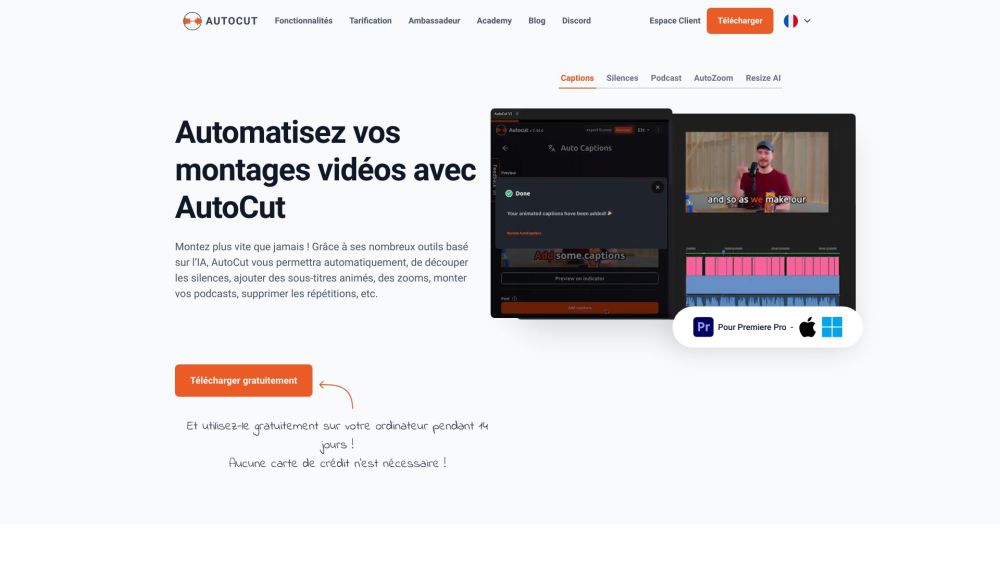


What is AutoCut?
AutoCut is a Premiere Pro & DaVinci Resolve plugin using AI to add animated subtitles, remove silences, edit podcasts, add stock videos, apply zooms, remove repetitions, and more. It automates manual tasks, saving users hundreds of hours by accomplishing time-consuming tasks in seconds with its AI features.
How to use AutoCut?
AutoCut is an add-on for Adobe Premiere Pro & DaVinci Resolve. Download and install the plugin, then use its features within the editing software to automate tasks like removing silences, adding subtitles, and more.
AutoCut's Core Features
AutoCaptions: Adds animated subtitles.
AutoCut Silences: Removes silences.
AutoCut Podcast: Simplifies podcast editing.
AutoZoom: Automatically adds zooms.
AutoCut Repeat: Identifies and removes content repetitions.
AutoResize: Creates new sequences in social media formats.
AutoProfanity Filter: Masks profanities.
AutoB-Roll: Automates B-Roll integration.
AutoViral: Identifies high-potential segments for shorts.
AutoChapters: Analyzes and segments videos for YouTube chapters.
AutoCut's Use Cases
Remove silences from videos in seconds.
Add animated subtitles to videos quickly.
Edit multicam podcasts in minutes.
Automatically add zooms to videos.
Create viral shorts from long videos.
FAQ from AutoCut
Can I use one key/license on two computers?
Is AutoCut compatible with the free version of DaVinci Resolve?
Can I cancel my subscription later?
AutoCut Discord
Here is the AutoCut Discord: https://discord.gg/autocut. For more Discord message, please click here(/discord/autocut).
AutoCut Support Email & Customer service contact & Refund contact etc.
Here is the AutoCut support email for customer service: [email protected] .
AutoCut Company
AutoCut Company name: AutoCut .
AutoCut Login
AutoCut Login Link: https://www.autocut.fr/app/
AutoCut Sign up
AutoCut Sign up Link: https://www.autocut.fr/app/
AutoCut Pricing
AutoCut Pricing Link: https://www.autocut.com/en/?utm_source=toolify#pricing
AutoCut Youtube
AutoCut Youtube Link: https://www.youtube.com/@autocut-premiere-pro-extension
AutoCut Linkedin
AutoCut Linkedin Link: https://www.linkedin.com/company/autocut/
AutoCut Reviews (0)
AutoCut Pricing
Basic Plan
$6.6/month ($79.0 billed yearly)
AutoCut Silences v2, Automatic J-Cut & L-Cut, AutoCaptions, AutoCut Podcast, AutoZoom, AutoViral, AutoB-Roll, AutoProfanity Filter, AutoCut Repeat, AutoChapters
AI Plan
$14.9/month ($178.8 billed yearly)
Silences + All AI features: AutoCut Silences v2, Automatic J-Cut & L-Cut, AutoCaptions: adds animated captions, AutoCut Podcast: edits podcast instantly, AutoZoom: automatically adds zooms, AutoViral: creates viral shorts from long videos, AutoB-Roll: automatically adds B-Roll, AutoProfanity Filter: bleeps out swear words, AutoCut Repeat: removes bad takes, AutoChapters: creates chapters in long videos
For the latest pricing, please visit this link: https://www.autocut.com/en/?utm_source=toolify#pricing
Analytic of AutoCut
AutoCut Website Traffic Analysis
AutoCut Discord Users Analysis
Latest user counts
AutoCut Launch embeds
Use website badges to drive support from your community for your Toolify Launch. They're easy to embed on your homepage or footer.



Alternative of AutoCut

 45.22%
AutoCut Comparisons
More Content About AutoCut
11 Tips for Streamlining Adobe Speech to Text in Premiere Pro
By Lily on August 18 2024
Master Adobe Premiere Pro's speech to text feature with these 11 essential tips for a smooth and efficient workflow. Boost your video editing game now!
Social Listening