Sponsored by
APIMart



ChatGPT Toolbar Companion - Chrome Extension
3.4
10 Reviews
0 Saved
Introduction:
Browser extension enhancing ChatGPT with prompts, text-to-speech, speech-to-text, and customization.
Updated Time
May 22 2024
Active Users
722

iMean AI Trip Planner
AI trip planner that creates personalized itineraries, finds cheap flights and hotels, and helps you plan an entire trip in one chat.

Free
PaioClaw
Managed, secure platform for deploying and automating OpenClaw AI assistants in 60 seconds.

Auditfyy
AI-powered white-label SEO audit software with Google integrations for digital agencies.

Flowith 2.0
AI Creation Workspace for knowledge transformation and collaboration with AI models.

iDox.ai Guardrail
Real-time AI guardrails that prevent sensitive data exposure in AI tools, copilots, and autonomous AI agents.

ChatGPT Toolbar Companion AI Chrome Extension Information
What is ChatGPT Toolbar Companion ai chrome extension?
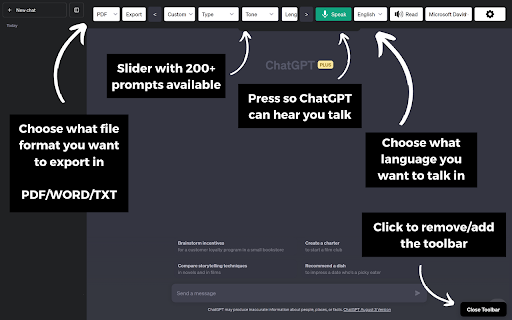
The ChatGPT Toolbar Companion is a browser extension designed to enhance your ChatGPT experience. It offers a range of features including powerful prompts, text-to-speech, speech-to-text, auto-continue, and customization options, making your interactions with ChatGPT more efficient and engaging.
How to use ChatGPT Toolbar Companion ai chrome extension?
Download the ChatGPT Toolbar Companion, install it on a compatible browser (desktop or PC), and launch ChatGPT. If the toolbar doesn't appear, refresh the browser page.
ChatGPT Toolbar Companion ai chrome extension's Core Features
200+ Powerful Prompts
Two-Way Conversations
Deep Customization
Realistic AI Voices
Export ChatGPT
Instantaneous Access
Custom Prompt Creation
Advanced Speech-to-Text
Text-to-Speech
Auto-Continuation
Toolbar Modification
ChatGPT Toolbar Companion ai chrome extension's Use Cases
#1
Streamlining online engagements for maximum efficiency.
#2
Accessing ChatGPT via voice and text.
#3
Multitasking while engaging in chats.
#4
Immersive research and learning experiences.
#5
Enhancing conversations and sparking creativity.
FAQ from ChatGPT Toolbar Companion
What browsers are compatible with the ChatGPT Toolbar Companion?
What should I do if the toolbar doesn't appear after installation?
Are the Realistic AI Voices available on all browsers?
Maxworker.ai
Max is an AI coworker for your team inside Slack. He connects to 25+ essential work tools today, with 3,000+ tools coming soon, and turns your team’s context into ready-to-review work. Fixed price, no surprise.
Try Now
AD
Runable
Runable is a general AI agent that can execute any task, from building web apps, slides, reports, and documents to generating images, videos, and podcasts, all in one place. It doesn’t just create it connects. Runable integrates with thousands of your favorite apps so you can simply ask it to do the work for you.
Try Now
AD
Analytic of ChatGPT Toolbar Companion AI Chrome Extension
ChatGPT Toolbar Companion Active Users
Total Installed User
722 (77)
Alternative of ChatGPT Toolbar Companion AI Chrome Extension
Website
Contact for Pricing
AI AssistantAI CopilotAI Productivity ToolsAI ChatbotAI Report GeneratorAI Meeting AssistantAI Project ManagementAI Task Management
Open site
 30.91%
20.7K
30.91%SearchOrganic (49.13%)
Direct (26.96%)
Referrals (10.15%)