Sponsored by
APIMart



ChatGPT Flow - Chrome Extension
0
0 Reviews
0 Saved
Introduction:
Chrome extension for managing ChatGPT conversations with node-based flow diagrams.
Updated Time
Sep 19 2024
Active Users
59

Miro
AI innovation Workspace

Diagrimo
AI-powered tool to turn ideas/text into clear diagrams & infographics.

APIMart
AI API, 99.9% SLA. Your AI, Always On.

APIMaster
GPT up to 95% off + $20 trial. Fingerprint-verified APIs. Low-cost and stable.

iMean AI Trip Planner
AI trip planner that creates personalized itineraries, finds cheap flights and hotels, and helps you plan an entire trip in one chat.

Free
ChatGPT Flow AI Chrome Extension Information
What is ChatGPT Flow ai chrome extension?
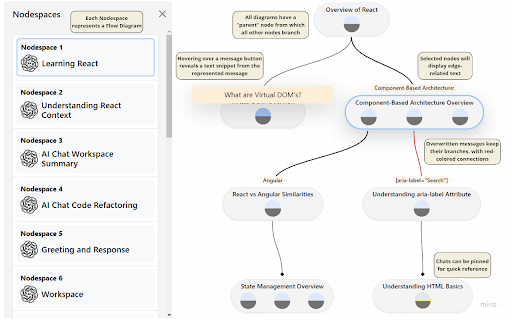
ChatGPT Flow is a Chrome extension designed to enhance the management of ChatGPT conversations. It transforms chats into a node-based flow diagram, providing users with the ability to organize and branch discussions effortlessly. This tool offers seamless navigation and an intuitive interface to enhance productivity and streamline workflow, making it ideal for brainstorming or handling large-scale projects.
How to use ChatGPT Flow ai chrome extension?
Install the Chrome extension. Right-click in ChatGPT to create parent or branch nodes. Access the visual chat diagram via the Chrome extension toolbar to manage and navigate chats. Click nodes to open chats and message buttons to jump to specific points.
ChatGPT Flow ai chrome extension's Core Features
Node-based visual flow diagrams of ChatGPT conversations
Branching conversations from highlighted text
Quick navigation to specific chats and messages
Real-time synchronization with ChatGPT changes
Multiple workspaces for organizing conversations by topic
ChatGPT Flow ai chrome extension's Use Cases
#1
Research: Track different topics and branch off new ideas.
#2
Project Management: Visualize connections between discussions in large projects.
#3
Learning and Development: Organize educational material by tracking conversations on subtopics.
#4
Brainstorming: Capture ideas and explore new possibilities in an organized manner.
FAQ from ChatGPT Flow
How do I create a new node?
How do I navigate to a specific message in a chat?
How do I access the visual chat diagram?
PoYo.AI
High concurrency. Stable AI API. Better pricing.
Try Now
AD
YouArt
Agentic Creative OS
Try Now
AD
Analytic of ChatGPT Flow AI Chrome Extension
ChatGPT Flow Active Users
Total Installed User
59 (2)

