Sponsored by
APIMart



ListenUp! - Chrome Extension
5
1 Reviews
0 Saved
Introduction:
Chrome extension to record, transcribe, and centralize call insights.
Updated Time
Jun 30 2025
Active Users
118

Demi AI
Proactive AI assistant for sales professionals to automate emails, scheduling, and deal prioritization.

Tripo AI
AI-powered 3D model generator from images and text.

YouArt
Agentic Creative OS

APIMart
AI API, 99.9% SLA. Your AI, Always On.

PostMcpAi
AI-powered social media publishing across seven networks

ListenUp! AI Chrome Extension Information
What is ListenUp! ai chrome extension?
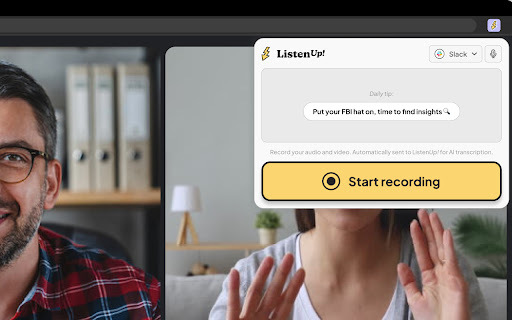
ListenUp! is a Chrome extension designed to record and transcribe calls, allowing users to centralize insights from these calls with other sources for better product decisions.
How to use ListenUp! ai chrome extension?
1. Add the ListenUp! extension to Chrome and pin it. 2. Open the extension during a call and press “start recording”. 3. At the end of the call, press “stop recording”. Call recordings are automatically added to the ListenUp! space in the “Captures” section and transcribed.
ListenUp! ai chrome extension's Core Features
Call recording
Automatic transcription
Centralized insights storage
ListenUp! ai chrome extension's Use Cases
#1
Record customer interviews to identify key feedback and pain points.
#2
Transcribe sales calls to analyze successful strategies and areas for improvement.
#3
Document product feedback from user research sessions.
FAQ from ListenUp!
How do I record a call with ListenUp!?
Where are my call recordings stored?
Is the call automatically transcribed?
Agentkit
AI agents trained on business content for support, lead capture, and automation
Try Now
AD
Skild Art
一站式 AI 视觉创作平台,为商业营销而生
Try Now
AD
Analytic of ListenUp! AI Chrome Extension
ListenUp! Active Users
Total Installed User
118
Alternative of ListenUp! AI Chrome Extension
Website
Contact for Pricing
AI Meeting AssistantAI AssistantAI CoachingAI Task ManagementAI Productivity ToolsAI Knowledge Management
Open site
--
Mail (0.00%)
GenAi (0.00%)
Direct (0.00%)
Website
Free Trial
AI Meeting AssistantAI SummarizerAI TranscriptionAI Note TakerAI Video SummarizerAI Task ManagementAI Speech-to-Text
Open site
--
Mail (0.00%)
GenAi (0.00%)
Direct (0.00%)
More Content About ListenUp!
9 Tips to Streamline Your Recording Transcription Process
By Emmett on August 05 2024
Transform your recording transcription process with these 9 expert tips. Streamline your workflow and save time with simple, practical strategies. Click now for a smoother transcription experience!
Recommend To Learn
record to text
record speech to text
transcription video to text
speech to speech ai
speech to speech
chrome speech to text
recording transcription
to text to speech
ai speech recognition
transcription ai
ai transcription
video to text
video transcription
voz
Text-To-Speech
Speech-To-Text
Text-to-speech
speech to text
Speech
Voice-to-Text
Video Generation
Text-to-video
Video
texto a voz