Sponsored by
Vmake Labs Video Enhancer



Open in GPT - Chrome Extension
4
4 Reviews
0 Saved
Introduction:
Chrome extension to open selected text in ChatGPT with a custom prompt.
Updated Time
Oct 07 2024
Active Users
193

Flowith 2.0
AI Creation Workspace for knowledge transformation and collaboration with AI models.

PaioClaw
Managed, secure platform for deploying and automating OpenClaw AI assistants in 60 seconds.

iDox.ai Guardrail
Real-time AI guardrails that prevent sensitive data exposure in AI tools, copilots, and autonomous AI agents.

Miro
AI innovation Workspace

Nextbrowser
Automate logins, scraping, outreach, and more — just by chatting with AI.

Open in GPT AI Chrome Extension Information
What is Open in GPT ai chrome extension?
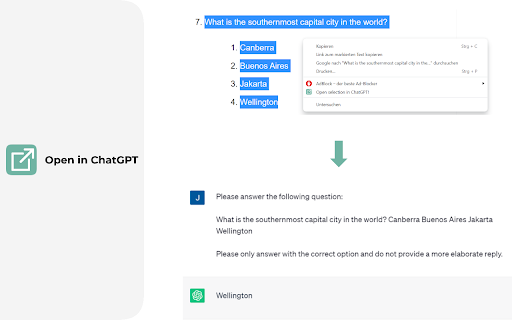
Open selected text directly in ChatGPT with a customized prompt. This extension enables you to quickly open selected text in ChatGPT by right-clicking. Customize ChatGPT's behavior by setting a pre-filled prompt to provide contextual information. This ensures ChatGPT behaves like you want it to behave and enables you to make it solve repetitive tasks for you -- Automate the automation 🚀
How to use Open in GPT ai chrome extension?
Click the extension icon to configure your custom prompt. Select text and right-click, then choose "Open selection in ChatGPT!" (Alternatively, press ALT + S). If you're working with other programs, use ALT + C to populate the prompt from your clipboard instead of selecting text.
Open in GPT ai chrome extension's Core Features
Opens selected text in ChatGPT with a custom prompt
Right-click context menu integration
Clipboard support for prompt population
Customizable prompt settings
Open in GPT ai chrome extension's Use Cases
#1
Answer questions in a specific manner (e.g. only ever answer with A, B, C, or D)
#2
Give general context for tasks like summarizing a paragraph
#3
Resolve code errors
#4
Get language assistance
#5
Translate text
#6
Generate content in specific ways
#7
Automate repetitive tasks in ChatGPT
FAQ from Open in GPT
How do I configure the custom prompt?
How do I open selected text in ChatGPT?
Can I use the extension with other programs?
Runable
Runable is a general AI agent that can execute any task, from building web apps, slides, reports, and documents to generating images, videos, and podcasts, all in one place. It doesn’t just create it connects. Runable integrates with thousands of your favorite apps so you can simply ask it to do the work for you.
Try Now
AD
Raccoon AI
The AI Coworker for Apps, Research, Docs & Everything Else. Raccoon AI is a collaborative AI agent and workspace for getting real work done. You describe what you need and build it together with an AI agent that has its own computer, terminal, browser, and internet. You see every thought, every file it creates, every decision it makes. You steer when it drifts. You ship when it's right. Deploy web apps. Run deep research. Analyze data. Create pitch decks, videos, images, documents and more.
Try Now
Analytic of Open in GPT AI Chrome Extension
Open in GPT Active Users
Total Installed User
193 (6)
Alternative of Open in GPT AI Chrome Extension
Website
Freemium
Free Trial
Contact for Pricing
AI WorkflowAI Task ManagementAI Project ManagementAI Productivity ToolsAI Schedule Maker
Open site
 66.03%
8.2K
66.03%Direct (91.82%)
SearchOrganic (4.81%)
Referrals (2.55%)
Website
Free Trial
Paid
Contact for Pricing
AI WorkflowAI Document ExtractionAI AccountingNo-Code&Low-CodeAI AgentAI OCRAI API
Open site
 31.54%
248.2K
31.54%SearchOrganic (48.54%)
Direct (38.16%)
SocialOrganic (7.43%)