Sponsored by
APIMart



Quick Screen - Chrome Extension
0
0 Reviews
0 Saved
Introduction:
A screen recording tool with automatic zoom and easy editing.
Updated Time
Jul 15 2024
Active Users
17
Browser Extension
Paid
Free
AI Video RecordingAI Video EditorAI Animation GeneratorAI Video Enhancer 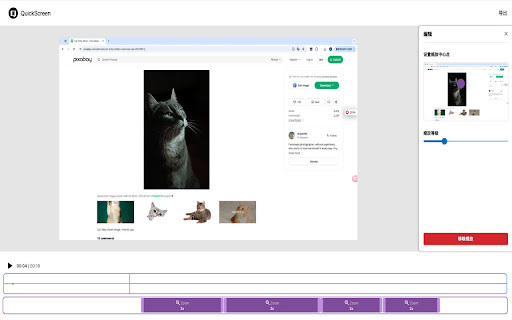

Velo
AI video infrastructure to explain, train, and sell faster.

PoYo.AI
High concurrency. Stable AI API. Better pricing.

APIMart
AI API, 99.9% SLA. Your AI, Always On.

iMean AI Trip Planner
AI trip planner that creates personalized itineraries, finds cheap flights and hotels, and helps you plan an entire trip in one chat.

Free
YouArt
Agentic Creative OS

Quick Screen AI Chrome Extension Information
What is Quick Screen ai chrome extension?
Quick Screen is a screen recording tool that simplifies the process of creating engaging video content. It offers features like automatic and manual zoom, easy editing, and optimized export to ensure the best viewing experience.
How to use Quick Screen ai chrome extension?
To start recording, simply click the Quick Screen button in your browser extension. The tool will automatically focus on key actions on your screen. You can also manually add zoom elements and edit the timeline by dragging zoom points.
Quick Screen ai chrome extension's Core Features
Automatic zoom
Manual zoom with animated effects
Optimized export for best viewing
Easy timeline editing
Quick Screen ai chrome extension's Use Cases
#1
Creating tutorials with focused attention on specific screen elements.
#2
Demonstrating software features with dynamic zoom effects.
#3
Recording presentations with clear and engaging visuals.
FAQ from Quick Screen
How do I start recording with Quick Screen?
Can I manually adjust the zoom?
How does Quick Screen optimize videos for export?
How do I edit the video?
Agentkit
AI agents trained on business content for support, lead capture, and automation
Try Now
AD
PostMcpAi
AI-powered social media publishing across seven networks
Try Now
AD
Analytic of Quick Screen AI Chrome Extension
Quick Screen Active Users
Total Installed User
17 (-2)
Alternative of Quick Screen AI Chrome Extension
Browser Extension
Freemium
AI Video RecordingAI Video TranslatorAI Voice CloningAI Caption Generator
Open site
1000 users
Open site
2.0K users
Website
Contact for Pricing
AI Video RecordingAI TranscriptionAI MarketingAI RecruitingAI Video EditorAI Customer Service
Open site
--
Mail (0.00%)
GenAi (0.00%)
Direct (0.00%)